Sunday, 1 January 2023

Formatting, copying and writing floppy disks

Personally, I have not used a floppy disk in over 15 years, but if you are into retro computers and still use them, then you must check out this excellent Adrian's Digital Basement YT video:

In the video, he describes how to use the DOS ImageDisk program to test, read and write all sorts of  floppy disks.

Wednesday, 28 December 2022

Latest eBook (PDF) 'Getting started with Ventoy v1.14' is now available

I have updated the eBook for Ventoy v1.0.86 and added some more exercises, etc.

If you have already purchased an older version of the PDF, just use the link in the confirmation email to download the new version of the PDF for free.

The Ventoy eBook contains many hints and tips such as how to make an external F6 user menu that can run grub and grub4dos commands (including how to use grub4dos paths/filenames with spaces).

I have also revised some of the other eBooks to bring them up to date.

Here is a list of the current versions, most have been updated within the last few months:
  • E2B #1 - Getting started with Easy2Boot_v2.22.pdf
  • E2B #2 - How to install Microsoft Windows using Easy2Boot_v1.9.pdf
  • E2B #3 - How to make a UEFI multi-boot Easy2Boot USB drive using .imgPTN files v1.03.pdf
  • E2B #4 - UEFI-multiboot using the a1ive grub2 File Manager_v1.26.pdf
  • Getting started with Ventoy v1.14 (for Ventoy v1.0.86).pdf
  • Getting started with grub4dos_v1.03.pdf
Just use the download link in your conformation email to download the latest version. All updates are free.

Thursday, 22 December 2022

Free Christmas games

Don't just watch TV at Christmas, enjoy the time that you are together!

After a hearty and boozy Xmas lunch, many families play Charades, but here are two more games my family like and play quite often:

Call my Bluff

This is just like the TV game. You will need two large dictionaries (or online dictinaries) and split into two teams each with a captain.

1. Each team finds an obscure word in their dictionary. One person in the team must give the true definition and the others must make up false definitions.
2. One team starts first, states the word and then each team member 'defines' the meaning of their chosen word. The person giving the true definition can, of course, adjust it and embelish it, as long as they don't change the core meaning. The person(s) giving their own made-up but plausible definition must sound as convincing as possible.
3. The other team can ask questions (say 2 each) and then the captain must decide which one was giving the true meaning and then ask if they were correct. They score one point if they guess right.
4. Now its the other teams turn.

This can be quite hilarious, especially if you can lie well and can keep a straight face!

Like or Hate

Going round the table or room one person at a time, each person must say out loud one thing that they either hate or love, e.g. horror movies, Marmite crisps, oysters, Mr Bean, yellow cars, etc. and write either LOVE or HATE on a card.  The others must put their hand on their heart if they think you love that thing or stick their finger in their mouth if they think you hate it. You then must show the card and explain why you love/hate it. You record the scores as one point for anyone who guessed correctly and as you take the scores, each person must explain if they agree with you or not and why, as they lower their 'voting' hand.

 Instead of points, you can substitute shots (but maybe not for granny).

What are your favourite family games?

Tuesday, 13 December 2022

How to prevent DropBox interfering with compilers and other programs

I have good internet performance and I use a local DropBox folder which is synchronised to the 'Cloud'. This works well for all the files that I want to backup and preserve.

I also put all my development folders in the DropBox folder so that, should I have a disk failure or damaged/corrupted filesystem, I will not lose any recent changes and days of work.

Of course, I make offline backups too, but this maybe only once a month or at the finish of a new project or project update.

One of my projects uses Inno Setup to make a self-installing .exe file, however, I noticed that very often the Inno Setup compile operation would fail to complete when using a project which contained files situated in a DropBox folder. I could try compiling maybe five times before the last attempt would work. If I used a non-DropBox folder then there was never any problem. Presumably, DropBox was busy synchronising any recently changed files and this interfered with the compiler.

To fix the issue I decided to write a small batch file to temporarily suspend dropbox, run Inno Setup and then re-enable DropBox. Here is a simplified example:

REM suspend dropbox
pssuspend dropbox  >nul 2>&1
"c:\Program Files (x86)\Inno Setup 6\ISCC.exe" .\_InnoE2B.iss > nul
if errorlevel 1 echo FAILED! & PAUSE
REM re-enable dropbox
pssuspend dropbox -r > nul

This seems to do the trick!

Sunday, 4 December 2022

E2B v2.19c Beta available with INDONESIAN language menu option

A user, Mikail, has kindly spent a lot of time and effort adding the two language files to support INDONESIAN for the E2B menu system.

If you can understand Indonesian, please test the latest E2B v2.19c Beta and check all menu entries, help text and the F1 help menu pages.

Check the 'Latest Beta' folder in the 'Alternate Downloads' 1Drive or Box depositories to download the new Beta.

Saturday, 26 November 2022

Quickly improve the Windows Explorer right-click context menu

The Windows Explorer right-click menu seems to be getting worse (especially in Windows 11)!

For many years we have had to put up with the 'Send To'  option not sending a file to somewhere else but instead copying that file to somewhere else! If I send a parcel or letter to someone, I don't expect it to be cloned first!

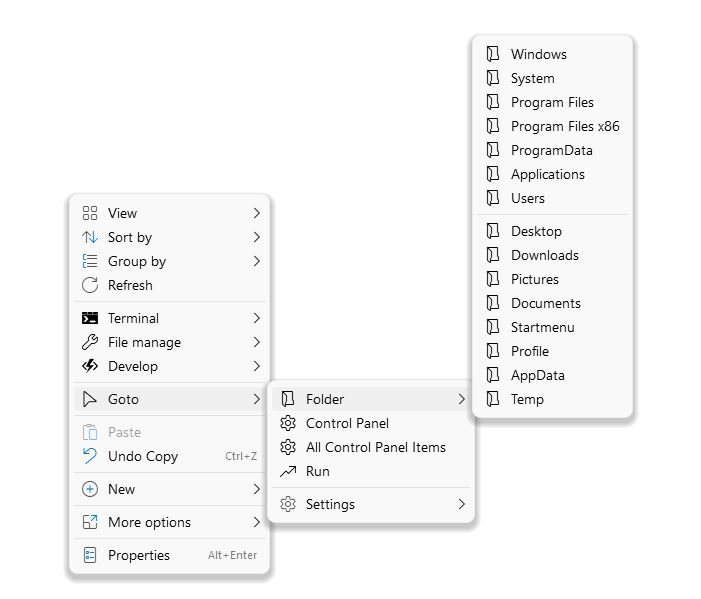
The Shell utility by Nilesoft solves some of these issues by adding extra useful entries to the Explorer right-click menu list.


Wednesday, 23 November 2022

How to run DOS utilities directly from an Easy2Boot USB drive

You may need to run a DOS-based test utility, BIOS Flash update utility or game on an x86 PC or notebook. Quite often the utility will be in the form of a bootable .ISO, .IMG or .IMA file which you can simply copy to a menu folder on your E2B USB drive. In some cases you may need to tweak the extension slightly, e.g. use xxx._isodos01.iso instead of .iso, depending on how the ISO has been constructed. Check the 'Tested Payloads' page to see if any special treatment is needed for any particular payload.

However, sometimes the DOS-based utility is provided as just a bunch of files and folders which you are supposed to copy to a floppy disk (remember those?).

Dr Hardware SysInfo is a typical example of a DOS-based test/report utility provided as a zip file which just contains the DOS files but no boot files...

Sunday, 20 November 2022

Black Friday website host deals

Approx. 60% of all websites use Wordpress. So I highly recommend the power and flexability of Wordpres versus any other content management system. By using WordPress you will not be locked in to a particular 3rd-party system where you need to pay for a 'premium' feature and you will also know that if you do have a problem with WordPress or Wordpress plugins, then many other people will also have had the same issue and will be able to help you (or any bug will be fixed very rapidly as it will affect many thousands of sites).

If you have read my eBook 'How to make $1000 a month from the Internet' you will see that I highly recommend (and use) Hostinger (#Ad link) as a WordPress web site host. At the moment they have a special Black Friday deal and offer up to 80% off  a 4-year hosting plan + 1 free domain & 1 free SSL for their 'Premium' web hosting plan. This works out at $2.49/month and it will allow you to create up to 100 websites.


Thursday, 17 November 2022

VentoyPlugson 1.0.82 for E2B now available

Ventoy v1.0.82 is released today.

You can add this latest version to your E2B/agFM USB drive as an image file if you want to run the
latest version of Ventoy - see here for details.

If you wish to configure the \ventoy\ventoy.json file you can use official \ventoy\VentoyPlugson.exe, however you will need to first switch in the new v1.0.82 Ventoy Partition 2 image file because the official version of VentoyPlugson.exe checks for 'official' USB drive partitions and MBR boot code.

If you want to run Plugson.exe without needing to switch in the official Ventoy partition image, you can download a modified v1.0.82 version of VentoyPlugson.exe which runs on an E2B USB drive by downloading the zip file in the 'Latest Beta' file store area and extracting it to the \ventoy folder on the E2B Partition 1 volume.

Note: The current 'Ventoy for E2B' version  which is modified to work directly from an E2B USB drive is v1.0.79.


Ventoy 1.0.82 Changes (VentoyPlugson relevant lines show in red)
  1. Ventoy2Disk.exe: Add exFAT/NTFS/FAT32 options in Option-->Partition Configuration for Ventoy installation.
  2. Ventoy2Disk.exe: Display Ventoy partition file system in selected disk
  3. Ventoy2Disk.exe: Fix the issue that string "Status x%" is missing for translations (#1667)
  4. Update Shim/Mokmanager efi file from Fedora 37.
  5. Add VTOY_SHOW_PASSWORD_ASTERISK option in global control plugon. (#1931)
  6. VentoyPlugson: Fix the issue that secondary boot menu option mismatch between web page and json file.
  7. Fix the issue that Linux WEB/GUI version does not restore MBR when updating. (#1935)
  8. Change Ventoy LiveCD GUI default language to English (#1938)
  9. Fix the issue that help line disappears when auto-going to a Fn submenu. (#1939)
  10. Fix an issue that CGI backup tool can not open after boot WePE.
  11. Optimization for Windows unattended install process.
  12. Fix the disk display error when pCloud virtual disk is installed in Windows OS.
  13. languages.json update

Saturday, 12 November 2022

Test AMD Radeon GPU RAM memory using Linux Scripts

 First watch the Learn Electronics Repair YT videos (and subscribe :-):

Using Linux to diagnose a fault:


How to run the test scripts:


Adding the test to any E2B USB drive

1. Download and add the ArchLinux ISO and copy to \_ISO\LINUX folder and make the file contiguous.

2. Download the two scripts,  unpack and copy to a \scripts folder on your E2B USB drive.

3. Boot to  the ISO and follow the instructions in the video (see screenshot below):


Type the correct command as explained in the video

I used these commands to get to the scripts folder:

fdisk -l

mkdir /ss

mount /dev/sda1 /ss

/ss/scripts


dmgg - test Polaris and Navi AMD GPU (RX400/RX500/RX5000)

memtest - generic test


This can also be done using Ventoy, but you should use the VTOY_LINUX_REMOUNT option in the global control section of the ventoy.json user config file so that the volume is accessible once booted to Linux.

See Also - other video card tests

See also MATS/MODS test article here and Kings OverKill article here.


Saturday, 5 November 2022

Add your own animated gif to E2B

 <<<


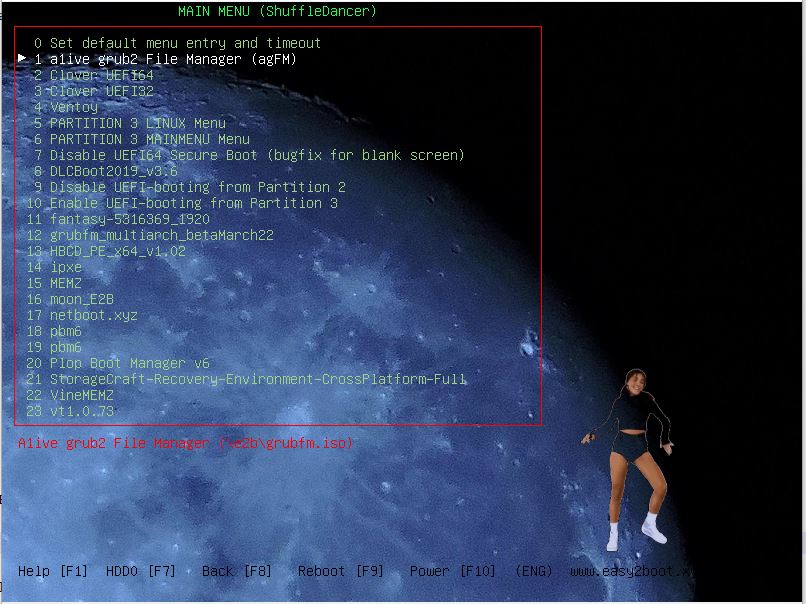
You can make your own animation like the shuffle dancer shown in the screenshot above (download here) in just a few minutes. The hardest part is finding an animated GIF in the first place like this one.

Friday, 4 November 2022

E2B Theme (Rosalind Franklin + DNA animation)


E2B menu plus DNA gif with transparent background

  • 1024x768
  • Rosalind Franklin wallpaper
  • Animated rotating DNA model
Use \_ISO\E2B_Editor.exe to change colours, wallpaper, etc. as you prefer.

You can download the files from here (Alternate Downloads - Themes folder). Just extract the files to the \_ISO folder.

Thursday, 3 November 2022

agFM v1.98 released

I have updated the default theme used by the \boot\grubfm\startup_default.cfg file in the agFM download so that it now uses the sample_slack theme. This means that if you are using the default file, you will now see a slightly different agFM startup menu with more items on the menu and with the boot mode displayed at the top of the menu (Legacy\BIOS, EFI32 or EFI64):

agFM default theme with menu heading text + boot mode

To update to the newest version, run:

Monday, 31 October 2022

VentoyPlugson.exe v1.0.81 for E2B drives now available

'Ventoy for Easy2Boot' is currently at v1.0.79.
The VentoyPlugson.exe utility has been slightly modified to work on an USB drive (not just official Ventoy drives) so that it will recognise any USB drive.

Sunday, 30 October 2022

E2B and agFM updates

  • E2B latest version is now v2.18 2022-10-28
  • agFM latest version is now agFM v1.97 2022-10-29
  • 'Ventoy for Easy2Boot' is still at 1.0.79d 20220-09-13
You can download the latest version of E2B here. If you have v2.16 of E2B, you can run Make_E2B.exe and click on the Update E2B Drive to download and update to the latest versions without needing to manually download E2B.


E2B recent changes:

Saturday, 29 October 2022

How to quickly identify what's in your old PC or Notebook (DOS SysInfo tools)

The Utilities menu in E2B will give you some details on PCI IDs (useful for finding the correct driver), BIOS-accessible disk drives and CPU Information...

E2B - UTILITIES - CPU Information

But if you are planning to install Windows or Linux onto an old PC or NoteBook, you can identify the hardware in a lot more detail bootable to an ISO such as the Hardware Detection Tool ISO file.

Thursday, 27 October 2022

Boot pmagic_2022_09_04.iso from E2B\agFM\Ventoy with persistence

This version requires a 64-bit CPU and needs at least 2GB of RAM (and 4GB if not using save feature).

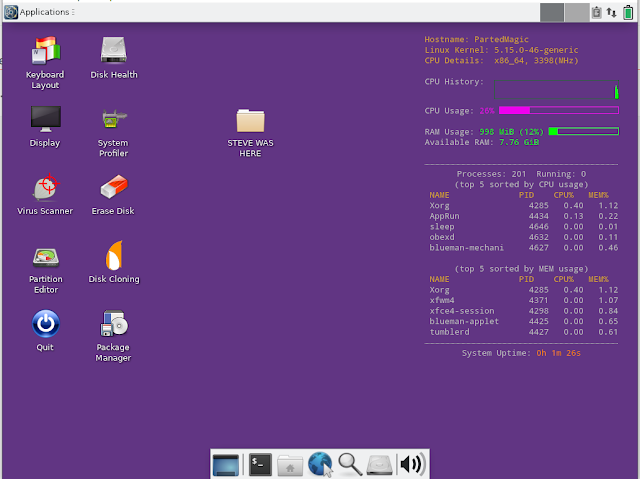
It is possible to boot Partition Magic 2022  from an ISO file and use the LIVE SAVE (persistence) feature which allows you to create a persistence file which is saved on exit and automatically loaded on boot.

My personalized purple Pmagic with persistence.

Wednesday, 26 October 2022

Add Gandalf’s Windows 10PE x64 Redstone 7 Spring 2022 Edition to E2B

Gandalf's WinPE is another popular Windows 10 x64 PE. It contains lots of programs and utilities but it is rather a heavyweight. The boot.wim file alone is 2GB and to run it you will need a 64-bit CPU and 4-5GB of RAM (depending on how you boot the ISO).


The boot.wim can take many minutes to load on some systems (depends on the BIOS USB 2/3 driver speed).

The download file is 'donationware' in that you must donate in order to be given a download URL, although if you Google enough, you can find a torrent link for a 5GB .rar download which can be unpacked to give a 10.8GB ISO file which supports UEFI64 and Legacy 64-bit booting.

I changed the filename to:
GandalfsWin10PEx64RS7-20H1_.isomap64.agfmisomap64.ISO
so that it would boot under E2B and agFM without prompting for options or showing a secondary menu.

Sunday, 23 October 2022

Add PhilsComputerLab's DOSBENCHMARK test utilities to your E2B or Ventoy USB drive (and run Quake and Doom!)

Phil has provided some DOS-executables which you can use to benchmark and test legacy BIOS PCs. As well as CPU, VGA and sVGA benchmarks, it also has the trial versions of Quake and Doom which you can play!

Speedsys 4.78 run on Lenovo IdeaPad300 notebook


The main menu is shown below:

Monday, 17 October 2022

Boot or Install ReactOS Live from E2B

If you want to try ReactOS (which is at Alpha status - so still very buggy!) you can download a .imgPTN23 file here which should boot to the LiveCD ISO.

ReactOS itself does not fully support USB 2/3 AFAIK, so you may need to attach a PS/2 keyboard and mouse if using a real system.