This version has the latest grub4dos which fixes a few small bugs in previous Beta versions (in particular if you are using the FONT24 feature).
Thursday, 3 March 2016
Wednesday, 2 March 2016
E2B v1.78j with large font support
Recent versions of grub4dos 0.4.6a support 24x24 pixel fonts.
I have added two font hex files to E2B v1.78j and also added some menu support for it.
The two font files added are fxt and sft (traditional Chinese and simplified Chinese, I think?) - they also support English characters but not other language characters, because they do not contain any special characters such as umlaut Ü, etc.. Also, the odd English character may be missing too, e.g. ~.
Because these font are bigger, it means there are less rows and columns on the screen.
800x600 = 33 columns by 25 rows
1024x768 = 42 columns by 32 rows
I have added two font hex files to E2B v1.78j and also added some menu support for it.
The two font files added are fxt and sft (traditional Chinese and simplified Chinese, I think?) - they also support English characters but not other language characters, because they do not contain any special characters such as umlaut Ü, etc.. Also, the odd English character may be missing too, e.g. ~.
Because these font are bigger, it means there are less rows and columns on the screen.
800x600 = 33 columns by 25 rows
1024x768 = 42 columns by 32 rows
Tuesday, 1 March 2016
E2B v1.78i Beta available
This version has the latest \grldr grub4dos 0.4.6a file (not the final version yet but seems to be fully working).
The splashimage --animated command now supports up to 999 animation frames.
The frame file names can be in xxxxxx01.bmp format or xxxxx001.bmp format.
You can download the new DNA_Animation.zip file and add it to E2B v1.78i. It will now display all 120 frames of the rotating DNA model in a smooth continuous loop.
I have also added a 'ls' menu entry to the Utilities Menu in v1.78i.
The splashimage --animated command now supports up to 999 animation frames.
The frame file names can be in xxxxxx01.bmp format or xxxxx001.bmp format.
You can download the new DNA_Animation.zip file and add it to E2B v1.78i. It will now display all 120 frames of the rotating DNA model in a smooth continuous loop.
I have also added a 'ls' menu entry to the Utilities Menu in v1.78i.
Saturday, 27 February 2016
Friday, 26 February 2016
E2B Beta v1.78g now available
E2B v1.78g uses a new grub4dos 0.4.6a version which is not compatible with the previous E2B 1.78 Beta versions when using the STAMP and ANIMATE variables.
Note: See also this blog post for a 120-frame animated model of DNA!
If you are updating an earlier v1.78 which used STAMPn or ANIMATE, please check your MyE2B.cfg file and change the STAMPn and ANIMATE variables - otherwise you may not see any background and other strange things may happen!
E2B v1.78g is in the Alternate Download Areas as usual (see side panel in this blog).
N.B. The syntax has now changed slightly!
For STAMPn we need to add an extra parameter because STAMPs now supports transparent backgrounds:

Note: See also this blog post for a 120-frame animated model of DNA!
If you are updating an earlier v1.78 which used STAMPn or ANIMATE, please check your MyE2B.cfg file and change the STAMPn and ANIMATE variables - otherwise you may not see any background and other strange things may happen!
E2B v1.78g is in the Alternate Download Areas as usual (see side panel in this blog).
N.B. The syntax has now changed slightly!
For STAMPn we need to add an extra parameter because STAMPs now supports transparent backgrounds:

Note: The top STAMP1 and STAMP2 have a transparent background!
Wednesday, 24 February 2016
E2B v1.78f available
YaYa has suggested that we could create a floppy disk image (.ima) file containing the animation bitmap files and load the floppy disk image into memory using:
map --mem --read-only /bitmaps.ima (fd3)
map --hook
This means that the files will be quickly accessed from memory and makes for much smoother animation with no continuous access to the USB drive (it can even be unplugged and the animation will still play).
map --mem --read-only /bitmaps.ima (fd3)
map --hook
This means that the files will be quickly accessed from memory and makes for much smoother animation with no continuous access to the USB drive (it can even be unplugged and the animation will still play).
Tuesday, 23 February 2016
E2B v1.78e Beta available
Yaya has fixed the problem of the hotkey app disabling animation.
This new E2B Beta version has the new grub4dos version which lets us have an animation playing on the menu.
Copy the \_ISO\docs\Templates\Animate\MyE2B.cfg file to \_ISO to test it out!
New features documented on this page.
This new E2B Beta version has the new grub4dos version which lets us have an animation playing on the menu.
Copy the \_ISO\docs\Templates\Animate\MyE2B.cfg file to \_ISO to test it out!
New features documented on this page.
Monday, 22 February 2016
E2B v1.78d Beta available for testing!
The new animation and graphics features in the latest grub4dos version is still not quite fully working (the hotkey utility prevents the infinite-cycle animated GIF-on-menu feature from working), but can at least play a sequence of bitmaps smoothly (and with a transparent background if desired!) before the menu is loaded. You can also define up to 4 STAMPn variables to over-stamp your wallpaper with up to four different 'stamps'. It will also be possible to use different stamps for each menu - for instance, when the AntiVirus menu is loaded, it could show the same background but with an AV logo in the corner of the screen instead of the Main Menu logo. I will detail how to do this later.
set GMODE=800
# set a plain colour background
set MYWBMP=0xCC77EE

Graphics mode + plain background
Also, the MYWBMP variable now can be used to define a pure colour background instead of a bitmap or JPEG file. The value must begin with 0x (zero + lower case x) to be recognised as an RGB fill colour (e.g. 0xFF0000 would be red).set GMODE=800
# set a plain colour background
set MYWBMP=0xCC77EE
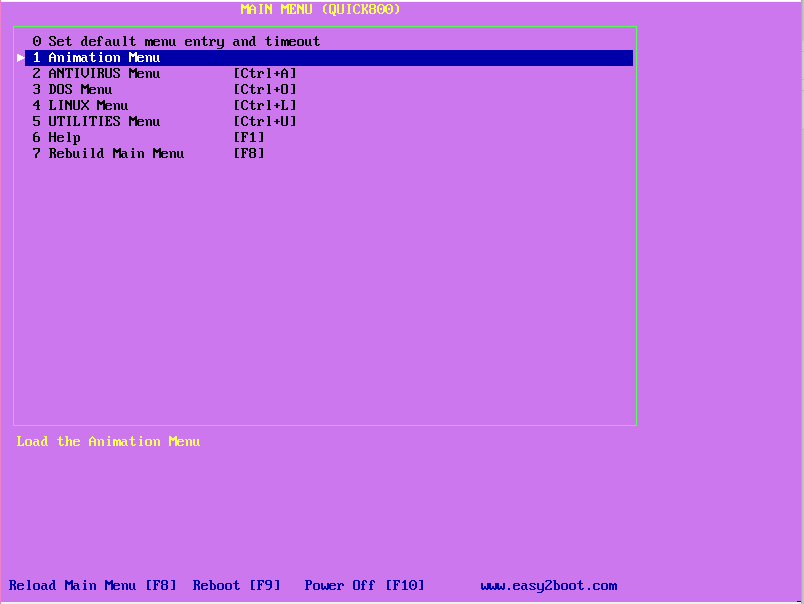
Use the 'Quick800' template - for quicker loading.
Saturday, 20 February 2016
Improved Plop! Boot ISO
The Plop! boot ISO allows you to boot from a CD and then boot from a USB drive. This is useful if the BIOS does not support USB booting or has buggy USB-boot support (e.g. if the BIOS tries to boot from the USB drive as a USB-Floppy or USB-ZIP drive).
Friday, 19 February 2016
Make a UEFI-bootable .imgPTN file from a Toshiba BIOS update ISO file
Toshiba BIOS update ISOs can be booted from Easy2Boot in MBR\CSM mode. They typically boot to a DOS hard disk image.

Subscribe to:
Posts (Atom)