Monday, 5 July 2021

Easy2Boot v2.10a Beta available with Win11 support

The new E2B Beta is here.

It adds a \_ISO\WINDOWS\WIN11 folder.

I have also speeded up the loading of the Main Menu if you have lots of files in the \_ISO\WINDOWS\xxxx folders. The Main menu no longer shows you how many payload files are present as they are no longer counted.

I installed a version of Win11 using VBox and E2B legacy and agFM UEFI64 successfully.

To update, just extract the files onto your USB drive.

Bypass the Win11 Compatibility check

To avoid the Win11 'compatibility check' you can install Win11 using WinNTSetup.

If you install to a Virtual Machine, the 'compatibility check' is skipped.

Or you can run these commands as soon as Setup is loaded to skip the checks:

Saturday, 3 July 2021

'Ventoy for Easy2Boot' v1.0.46 is now available for download

 I have now made an update for 'Ventoy for Easy2Boot' so it is now v1.0.46.

This is not the Ventoy image files but the modified version which is directly added to Partition 2 and can be booted to without switching in an image.

I had a problem with it where it would not boot Ubuntu ISOs and many other Linux ISOs unless Partition 2 was exactly 32MB in size - this is now fixed.

You can find the .zip file in the Latest Beta folders.

Instructions

1. Download the ventoy-1.0.46-windows.zip file

2. Drag-and-Drop the file onto the \e2b\Update agFM\Add_Ventoy.cmd  windows batch file using Explorer - answer Y to copy the files across.

You should now have the latest version of Ventoy for Easy2Boot

Please report any issues.

I will update the E2B server release version to this version in  a few days if no issues are reported.


Tuesday, 29 June 2021

agFM v1.72d Beta now available

 For those of you following my last few blog posts, agFM v1.72d includes the latest version of the Ventoy disk image scheme.

I have tidied it up a bit and renamed some files so that they appear first in the Ventoy menu system.

Also a new .mnu file is added to the \_ISO\MAINMENU folder to allow you to restore the original E2B partitions from a Legacy boot. This is quicker than booting to E2B - then Ventoy - then grubfm_multiarch.iso - then selecting 'Restore agFM Partition 2'. It also does not need to reboot.

So as not to clutter up the MAINMENU, I have not added three menu entries to switch in the Ventoy disk image files from E2B - you can just run agFM from the E2B menu and then switch in one of the Ventoy disk image files from the agFM Legacy menu.

To try it just extract the agFM download files onto Partition 2 (make sure you have the original agFM partition on Partition 2 first - not the Ventoy 32MB partition 2!).

Monday, 28 June 2021

Ventoy+Kaspersky Secure Boot bypass now available

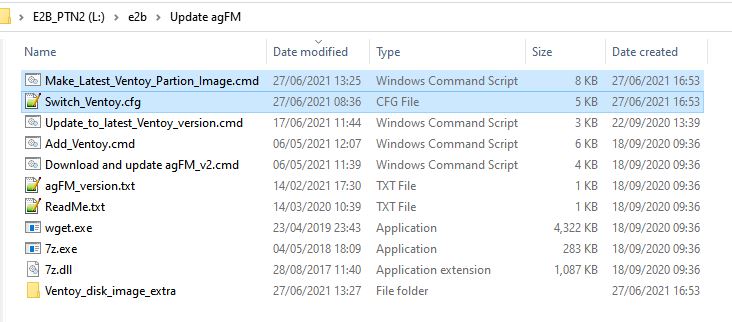
agFM v1.73c Beta now makes 3 Ventoy 32MB images when you run the Make_Latest_Ventoy_Partion_Image.cmd script.

1. Ventoy with Secure Boot/MokManager

2. Ventoy (no Secure Boot)

3. Ventoy with Kaspersky shim - can Secure Boot as long as the Kaspersky shim is not blacklisted in the BIOS UEFI DBx blacklist database (same as used by agFM).

Please update to v1.73c if you want to try out this new Kaspersky Secure Boot Bypass version of Ventoy.


Ventoy images are now made with and without Secure Boot

The standard Ventoy image that was made by the Make_Latest_Ventoy_Partion_Image.cmd script contained the Secure Boot enabled EFI boot files.

However, this version does not boot on many systems (such a Lenovo laptops, etc.) - I get a 'Linpus Lite' boot option but it won't Secure Boot or load MokManager.

So I have now modified the script to produce two Ventoy images, one with the Secure Boot (InSecure Boot) files and the other image which does not support Secure Boot. which is much more compatible (but won't work if Secure Boot is enabled in the BIOS).

I also find that MokManager does not work on many Secure BIOSes (crashes/hangs/doesn't load) which is why E2B does not use it.

So you can now you pick which Ventoy image you want (no need for two Ventoy USB drives).


Note: v1.72c now makes 3 images, the last one includes the Kaspersky Secure Boot bypass mechanism so you can Secure Boot to Ventoy without needing MokManager.

Update Instructions

First follow the previous blog article, then...

1. Download the latest agFM v1.72b Beta version

2. Extract it to Partition 2 of your E2B USB drive

3. Run \e2b\Update agFM\Make_Latest_Ventoy_Partion_Image.cmd to make the new Ventoy image files.

You should now have two img files on Partition 2:


The startup_default.cfg file will also be updated, but you will need to change your startup_menu.txt file if you have made your own  agFM startup menu.


if [ -f (${user})/ventoy.disk.img -a -f (${user})/Switch_Ventoy.cfg ] ; then
menuentry "Ventoy image (Secure Boot) [Ptn2=32MB image]" --class=img {
set vdisk=ventoy.disk.img
grubfm_open "(${user})/Switch_Ventoy.cfg"
}
fi
if [ -f (${user})/ventoyNS.disk.img -a -f (${user})/Switch_Ventoy.cfg ] ; then
menuentry "Ventoy image (no Secure Boot) [Ptn2=32MB image]" --class=img {
set vdisk=ventoyNS.disk.img
grubfm_open "(${user})/Switch_Ventoy.cfg"
}
fi

Sunday, 27 June 2021

Easy2Boot now supports all Official Ventoy images!

The current 'Ventoy for Easy2Boot' version is a modified version of Ventoy v1.0.35. It is a modified, re-compiled version of the 'official' Ventoy v1.0.35.

The E2B version of Ventoy is exactly the same as the official version but the size check of the 32MB Partition 2 has been removed so that we can have a Partition 2 greater than the paltry 32MB installed by the Ventoy tool.

agFM v1.72a can now switch-in any 'official' Ventoy Partition 2 image file in-place of the agFM partition.

You can make the image file simply by running the Make_Latest_Ventoy_Partition_Image.cmd file:

This will automatically download and extract the latest 32MB ventoy.disk.img file from the Ventoy github folder.

Once switched-in, you now have an 'official' Ventoy USB drive with exactly the same partitions that the Ventoy utility would create. All the Ventoy code is 100% official, unaltered and original.

Update Instructions

This assumes you have E2B v2.09 installed already with agFM and Ventoy.

1. Ensure that your E2B USB drive does not have any .imgPTN partition image already switched in - the easiest way to check this is to run \_ISO\SWITCH_E2B.exe - if the 'Restore E2B Partition(s)' button is NOT greyed-out then click it to restore the original E2B partitions.

2. Download the latest v1.72a Beta zip file of agFM and extract all the files to Partition 2 of your E2B USB drive - this overwrites the existing agFM files.

3. Run \e2b\Update agFM\Make_Latest_Ventoy_Partition_Image.cmd
    from Partition 2 of the USB drive - if prompted to download the grubfm iso file - answer 'Y'.


4. Run \MAKE_THIS_DRIVE_CONTIGUOUS.cmd

If you have used your own \boot\grubfm\startup_menu.txt file for your agFM menu, you will be warned and you will need to add an extra menu entry into your startup_menu.txt file. If you are just using the startup_default.cfg file then this will be updated for you automatically.

The file \ventoy.disk.img on the second partition is the new Ventoy image - do not move this file - it must be located on Partition 2.

If you do not already have ImDisk installed on your Windows system, you can download it from here.

Usage

To switch-in the new Ventoy partition image into Partition 2 we use the agFM menu entry.

To switch back to the original agFM partition 2, we need to first boot to the grubfm iso (which is on the root of the E2B Partition 1) - once booted to grubfm - a special menu is loaded where you can restore the original partitions.

Note: Ventoy does not contain dd and so we cannot use the grub2 dd command to change the disk partition table so we must boot to grubfm which does support dd.

Step 1 - Switch-in the Ventoy Partition image

1. Boot to agFM (either Legacy\MBR boot to the E2B menu and then load agFM or UEFI-boot direct to agFM on Partition 2.

2. Select the new 'Official Ventoy' menu entry - the image file will be switched in and the system will reboot.


You can now Legacy\MBR boot to the new Ventoy image via the E2B Legacy menu or directly UEFI boot to Ventoy.

Note: Do not attempt to switch-in any .imgPTN partition images whilst in this state! Do not attempt to 'fix' the drive if prompted by E2B.

Step 2 - Restore the original agFM

1. First boot to Ventoy and then select the grubfm_multiarch.iso entry:


You should now see a new grubfm menu:
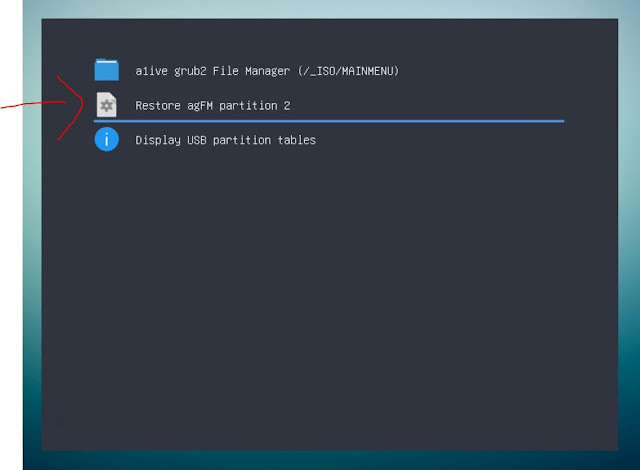
grubfm multiarch will load the user menu in the Ventoy partition.

Note: Do not delete the grubfm multiarch ISO file from the root of the E2B USB drive. You can copy it to a 'normal' menu folder as well, if you find it useful.

2. Select the 'Restore agFM partition 2' menu entry - confirm by pressing 1 and ENTER when prompted. The original partitions will be restored and Partition 2 will contain the agFM (and old Ventoy) files. The system will reboot.

Future Ventoy updates

When a new version of Ventoy is released, simply run the
\e2b\Update agFM\Make_Latest_Ventoy_Partition_Image.cmd script again.

If a later version of grubfm multiarch iso is released by a1ive, you can update the ISO file if you like, it should still work OK.

Please let me know if you find any issues.

Thursday, 17 June 2021

eBooks updated

  •  eBook #4 - agFM - now v1.21
  • Getting started with E2B - now v2.20
  • How to make $1000 a month from the internet - now v1.03

To obtain your free update, use the original email that was sent to you on initial purchase.

Purchase eBooks from here. Most are just $5 each and you get a 10% discount on all of them if you buy more than one! Read some reviews to see what others have to say before you buy.

'How To' articles on easy2boot.xyz

 Visit https://easy2boot.xyz/blog/  for new articles as well as the posts in this blog which are listed here.

Easy2Boot v2.09 and agFM v1.71 latest release available

E2B v2.09 changes
  • New default background
  • Changes to UPDATE_E2B_DRIVE.cmd, E2B Launcher.exe, SWITCH_E2B.exe, SUB_MENU_Maker.cmd, E2B SUBMENU Maker.cmd, StartupCheck.cmd, Add_Ventoy.cmd, CheckForUpdate.cmd, Download and update agFM_V2.cmd, MAKE_E2B_USB_DRIVE.cmd
  • Sample mnu files added: PTN3_IMGPTNREP3_MENU.mnu, PTN3_MNU.mnu, PTN2_AUTO.mnu, PTN3_AUTO.mnu. PTN_LOG1_AUTO.mnu, Parrot_4.11.2_Persistent.mnu
  • REP3.g4b and RestoreMBR.g4b added
  • wimboot updated (bugfix for bootmgr)
  • DLC and Strelec now always swaps hd0 with hd1 before boot
  • bugfix for .isopup extension
  • Fix Win7 install not swapping hd0-hd1
  • Add .imgPTNREP3 support
  • Support for xxx_ file prefix
  • .isodd no longer supported - use .isodef
  • SDI_CHOCO.cmd improved for Win8 installs (fix access denied error with some versions of Win8 fixed)
  • PassMark Memtest86 .imgPTN23 updated to latest version 9.1 Free

agFM v1.71

  • Latest PassMark Memtest86 9.1 Free
  • Improve .imgptnREP3 support
  • Support for Strelec ISOs on UEFI32 devices with 64-bit CPUs (e.g. Asus T100).
  • Add DrWeb+persistence .grubfm example to \e2b\Sample agFM Menu Files folder
  • Add slacko_v7.grubfm and .cfg sample file added to \e2b\Sample agFM Menu Files\Linux folder for Puppy booting.
  • More file extensions supported

agFM v1.71 is live and you can update using 
"\e2b\Update agFM\Download and update agFM_v2.cmd" 
or just get the latest 1.71 zip version and extract it to Partition 2.

E2B v2.09 is on the Alternate Download sites

Please make a new drive and let me know if you find any issues.


Sunday, 6 June 2021

How to fix Windows when it no longer detects your USB drive

Windows 10 seems to have a nasty habit of sometimes not detecting a USB drive that had been working fine 5 minutes ago and still works OK in other systems - just not the one you are using!

I can have no problem for months and then one day, Windows 10 does not seem to recognise my USB drive because it does not list the drive volume letters in Explorer - but only if I connect it to a certain specific USB port! I can connect the same drive to a different USB port and everything works as normal.

One month it can be the lower USB 3 port and the SanDisk Extreme 3 USB drive - another time it can be my super-fast SilverStone USB 3 M.2 SSD enclosure and a different USB port. It's just pot luck!

Another issue I often come across, is that I insert a particular USB drive into a particular USB port and Windows goes into an everlasting cycle of mounting the drive and then dismounting it again and again and again ('dong-diddle-ding' - then 'ding-dang-dong', etc. etc.)!  Often a reboot fixes this (as long as I first unplug the USB drive before a Windows Restart).

Here is what I do to fix USB drive issues (after trying a Windows Restart, of course)

Note: A simple Windows Shutdown is not good enough! You must use Restart or SHIFT+Shutdown so that Fast boot is not used when you next switch on.

Saturday, 5 June 2021

E2B v2.09h Beta available

 E2B sorts payload files alphanumerically, so Ubuntu.iso will be listed after Tails.iso in the E2B menu.

E2B also supports filename prefixes in the form of  _*_ (underscore - any number of characters - underscore), e.g.:

_100_Ubuntu.iso
_110_Tails.iso

These will be listed in the E2B menu as:

Tails
Ubuntu

File extension override suffixes

You can also add file extension override suffixes, these too will not be displayed in the E2B menu system, e.g.

Format:  _ (file extension _ [agfm (agfm file extension)] . file-extension

_100_Ubuntu_.isodef_agfmisoagfm.iso
_110_Tails_.isodef_agfmismap.iso

The agfm file override is optional. If not specified then the first file suffix will be used for both E2B and agFM - e.g. _100_Ubuntu_.isodef.iso.

These will be listed in the E2B menu as:

Tails
Ubuntu

BUT both agFM and Ventoy will list the full filename. 

E2B will boot as if the file had a .isodef file extension, agFM will boot as if the file had a .isoagfm (or .isomap) file extension.

Note: If E2B MyE2B.cfg is configured to show the file extension (EXTOFF) then E2B shows the whole filename but without the prefix - e.g. Ubuntu_.isodef_agfmisoagfm.iso.

Hotkeys

Wednesday, 2 June 2021

E2B v2.09g/h and agFM v1.71f Betas

Previous versions of agFM recognised the .imgPTNREP3 file extension.

If you have a partition image .imgPTNREP3 file  (e.g. hfs partition containing a bootable Mac OSX installer files) on Partition 3, you could select it in the agFM menu system and it would replace the current Partition 3 (if any) with the new image. The partition should be recognised as being in FAT/NTFS/hfs format and use the correct Partition type (e.g. hfs= 0xAF).

You can thus UEFI-boot to agFM, switch-in any image to partition 3 and then boot to it from the agFM F3 boot menu or the MAC boot menu (e.g for Catalina Installer hfs image).

To restore the original partitions, you can UEFI-boot to the agFM menu system and choose the 'Restore E2B Partitions' menu option.

agFM v1.71f

Monday, 10 May 2021

Add Kali+Persistence to agFM menu system

 I have added a post here which describes how to add a .cfg file to boot Kali with Persistence.

agFM seems to have a small problem when the findiso parameter is used. It seems to 'lock' a partition and this causes Kali to not shutdown. The persistence file seems to be saved OK, but it won't then turn off the system or restart it.

This also occurs if you just boot the Kali ISO using agFM (without persistence) and choose the 'Debian - Debian Live' boot entry (which also uses findiso=).


I cannot report the issue as a1ive's grub and grubfm project seem to be in 'archive' read-only status recently.

Thursday, 22 April 2021

Add a Secure Boot partition to your E2B USB drive

 A recent Windows Update in Windows 10 has meant that the Kaspersky Microsoft-signed EFI boot file that is used by agFM on the Easy2Boot USB drive is often blocked by the target systems UEFI Firmware.

This prevents us from Secure UEFI-booting.


Apart from disabling Secure Boot in the BIOS, you can go into the BIOS Setup menu and delete/clear/reset the DBx UEFI database - or - another way around this problem is to place a version of WinPE on a new FAT32 3rd partition of the E2B USB drive.

Tuesday, 13 April 2021

'How to make $1000 a month from the Internet' eBook price now reduced to only $5


My latest eBook 'How to make $1000 a month from the Internet' has now been reduced to only $5 (was $10). It also now updated to revision v1.01.

If you want to supplement your income with some passive income from the Internet, then this book should help you.

See here for more details.

Monday, 12 April 2021

Fedora 33 live boot with persistence (fixed)

Fedora 33 with persistence

The Fedora LiveCD ISO can support persistence but the persistence file must be on a FAT32 or ext2/3/4 partition.

To boot from an Easy2Boot NTFS USB drive, we can convert the ISO to a FAT32 .imgPTN file and then add in the persistence file to the new FAT32 partition.

This process was described in a 2017 blog article here, however it seems Fedora persistence has changed slightly since then and recent versions no longer recognise the persistence file.

The blog instructions have now been updated so that you can Legacy and UEFI64-boot to a Fedora 33 .imgPTN file with a persistence file. Two folders needed to be added inside the persistence volume to fix the problem.


Tuesday, 6 April 2021

Latest Betas with bugfixes available and Puppy persistence

 E2B v2.09c

  • Add check in various .cmd files to check for wmic command in PATH 'wbem' environment
  • Remove Update E2B link from Launcher app.
  • Memtest86 .imgPTN23 updated to v9 build 2020 free version
  • Small text help changes to some Mainmenu .mnu files
  • Bugfix - fix Puppy ISOs with .isopup extension not booting

agFM 1.71c

  • Support for Strelec ISOs on UEFI32 devices with 64-bit CPUs (e.g. Asus T100).
  • Memtest86 v9 build 2020 EFI files updated.
  • Add DrWeb+persistence .grubfm example to \e2b\Sample agFM Menu Files folder
  • Add slacko_v7.grubfm and .cfg sample file added to \e2b\Sample agFM Menu Files\Linux folder for Puppy booting.
The new Beta versions can be found in the 'Latest Betas' folder in either of the two 'Alternate Download Areas' (see sidebar).

Puppy (.isopup)

I discovered that the .isopup file extension seems to no longer work in recent versions of E2B (grub4dos seems to have changed and broken it!), so I have modified the code in QRUN.cmd to now work again. 

Wednesday, 31 March 2021

31st March is World Backup Day!

 So when was the last time you backed up your files?

I tend to keep most of my 'important' files in the 'Cloud' these days, but if my main Windows SSD went kaput, it would still probably take me a good day to re-install Windows and add all the applications that I use and then I would need to allow all the files to re-sync with the 'Cloud'.

Kon-Boot v3.8 is released

 Kon-Boot (#ad) is currently the only solution worldwide I am aware of that can bypass Windows 10 online passwords!

The latest release fixes issues with Win10 20H2

 Main updates:

  • Updates for Windows 10 (Fixed issues and blue screen errors in newest Windows 10 releases (20H2 with newest security updates))


Kon-Boot can be added to your E2B USB drive (see previous article here). You will need to 'register' your E2B USB drive as a 'Kon-Boot' drive by first installing Kon-Boot and then wiping the USB drive and re-installing E2B (and then add back the Kon-Boot files).

Monday, 29 March 2021

RMPrepUSB.com change of host and a new Easy2Boot.xyz website

I have been doing a lot of work to transfer the content from the old RMPrepUSB.com website (which was hosted by Google Sites) to a WordPress website (now hosted by Hostinger). Well over 150 pages of text and about 300 images!

There was a lot of swearing, fist-banging and tears, I can tell you, because there was no easy, automated way to transfer it all! I have written up how I did it here, in case others want to move away from the 'New Google Sites' which we are being forced to do by Google because they are discontinuing the old Google Sites hosting. The New Google Sites cannot be integrated into Ezoic and it does not support Google AdSense(!). and so it is even less versatile and compatible than the old CMS version was.

I guess that's the problem with free sites and services - they can just decide to withdraw or drastically change them at any time! It wouldn't surprise me if Blogger wasn't up next for an 'improvement'. Actually this Blogger site and it's CMS is quite adequate for my needs and is free too, so they will probably muck that up soon as well!

My old rmprepusb.com site can still be found at the 'New Google Sites' 
https://sites.google.com/rmprepusb.com/www/home

But www.rmprepusb.com now points to the new WordPress site. At the moment it does not go through Ezoic however, so any ads on the site are placed there by Google AdSense automation.


New Easy2Boot.xyz site!

I have also started a new WordPress website at www.easy2boot.xyz - this is intended to be a 'simple' website for anyone who is new to E2B. The 'old' site is still at www.easy2boot.com.

Please look at the new site and let me know if there is anything I have missed out, that someone will need to get started.

At least the experience of migrating to WordPress has proved useful to me whilst writing my new eBook 'How to make $1000 a month from the Internet'!

If you are thinking of building a website, here is a tip for you - always go for a WordPress hosting site (Linux based) - never go for a host that only offers their bespoke Content Management Systems like Wix, etc. and don't be sucked-in by offers of free or very cheap rates for the first year (because the following year's rates won't be cheap)! More info in the eBook ;-).