Wednesday, 3 May 2023

Get 20% off your website hosting fee with Hostinger

Valid until May 17th, if you sign up with Hostinger (#ad link) (use this link) as your website host, you can get 20% off and 3 months free.

If you are thinking about starting your own blog site, personal website, forum or business website, I recommend Hostinger. I use them for both easy2boot.xyz and rmprepusb.com. The plan allows me to host up to 100 sites at no extra cost.

There are plenty of videos on YouTube to help you and I have also produced a small free eBook on to get you started to produce a small business website (eBooks are here). There is also a 'How to make $1000 a month from the Internet' eBook which may be useful to you.

Hostinger offer excellent value for money and their support is also excellent too.

The only thing to be aware of is that although they offer a free domain name for the first year, you should be careful to look at the renewal costs of the domain name before choosing one - some are $10 a year but some other domain names can cost $50 a year. For instance, domains ending in .xyz tend to be much cheaper than domains ending in .com. Just check the renewal prices of both the package and the domain before you sign up with them. Hostinger renewal prices are pretty cheap anyway though (e.g. $6.99 a month), and unlike some other well known host providers I could name, they actually tell you the renewal costs quite plainly before you sign up!


Monday, 24 April 2023

Use just one keyboard and mouse with all your computers using free 'Barrier' github software

If you have several computers+displays or notebooks on your desk, it is a nuisance to have to reach over to another mouse or touchpad or keyboard when you want to use it.

'Barrier' is an OS application (for Windows 64-bit and Mac OS X 10.10 Yosemite+ and Linux) which allows you to control other computers from one 'main' computer.

Once you install the software on your 'main' computer (can be Windows or Linux or Mac) as the 'server', when you move the mouse cursor to the screen edge, the cursor will appear on the other computer screen and anything you type will go to the other computer instead of your 'main' computer. You can configure multiple computers - here I just have a Lenovo IdeaPad 300 physically located to the left of my main desktop PC screen, so I have configured the server so that when I move the cursor to the left-hand edge of the screen, it moves over to the IdeaPad 300...

press the 'Configure Server' button to arrange


Setup on Windows is quite simple:

Friday, 21 April 2023

How to view and edit your UEFI BIOS secure boot keys

The bootable UEFI tool KeyTool.efi can save your UEFI Secure Boot keys or allow you to edit them.


Tuesday, 18 April 2023

Download a 'LiveDVD' version of a Windows 11 ISO

NTDEV is the developer behind Tiny11, a slimmed down version of Windows 11 Pro which did not require a TPM and only needs 2GB of RAM, has now unveiled a new modified variant of Windows 11.

This is called Live11 (alpha): which is a live but cut-down version of Windows 11 22H2 64-bit which is loaded into memory. You can make a DVD from the ISO or legacy boot to it from Easy2Boot.

Wednesday, 8 March 2023

New Windows 10/11 UEFI bootkit can bypass Secure Boot!

The first in-the-wild UEFI bootkit bypassing UEFI Secure Boot on a fully updated UEFI system is now a reality.

The vulnerability is mainly due to Microsoft not yet blocking a known security hole in the UEFI boot process (a new Microsoft OS KB update to fix the issue would be quite complicated and would have to change several key Microsoft boot files and the UEFI NVRAM dbx database, so it could cause Win10/11 systems to be non-bootable if the update process went wrong).

The BlackLotus exploit mechanism is explained in detail here and it is quite an interesting read if you want to gain a better understanding of how UEFI-booting, secure boot, etc. works and can be bypassed.


No doubt MS will provide a security patch via a KB update in due course...


Sunday, 5 February 2023

Where have all the birds and insects gone - and should we care?


Anyone over 30 will probably have noticed (if they think about it) that there are a lot less insects, birds and other wildlife now than there used to be in the UK and Europe. 

When gardening now, I hardly ever find any insects these days and very rarely hear a bird sing (despite living in a small rural village), but when I was a boy, the skies were full of birds and the lawn and gardens were crawling with all sorts of insects.

I can remember driving at night when I was much younger (1980s) and always seeing hundreds of insects caught in the beam of the car headlights and they were also stuck to the windscreen of the car. These days, I am lucky if I see one moth on my windscreen in a month!

The weight of insects caught per trap per day in 63 nature reserves in Germany declined by 76% between 1989 and 2014, a decline which is, statistically speaking, highly unlikely to be due to chance (p<0.001) [Hallmann et al. 2017].

No one seems to care, but it is really very important for our health, our food production and our planet because we are not only killing all the wildlife on the planet but also the human race.

Sunday, 22 January 2023

Add OpenCore to your Easy2Boot USB drive

E2B already includes Clover. You can UEFI64-boot to Partition 2 of the E2B USB drive and from the agFM menu you can browse to and run \EFI\CLOVER\CLOVERX64.EFI. The config.plist file in the \EFI\CLOVER folder will be used. Note that the config.plist file will be overwritten if you update agFM/E2B, so make a backup of it in the same folder if you need to edit it!

You can add the following grub2 menu entry to your \boot\grubfm\startup_menu.txt file if you want a menu entry in the agFM menu to be listed for Clover:

if $EFI64; then
if [ -f "(${user})/EFI/CLOVER/CLOVERX64.EFI" ] ; then
menuentry "Clover (UEFI64)" --class=settings {
set grubfm_file="(${user})/EFI/CLOVER/CLOVERX64.EFI"
grubfm_open "${grubfm_file}"
}
fi
fi


OpenCore is similar to Clover and is highly hardware dependent. The config.plist needs to be correct for your particular target PC and it is not trivial to set up (see Guide here).

However, if you want to boot to the OpenCore boot loader from an E2B USB drive you must add the OpenCore files as follows:

  1. Copy the EFI\OC folder to Partition 2 (which should be FAT32) at \EFI\OC

  2. Copy the \EFI\BOOT\BOOTX64.EFI file from your OC source to the same \EFI\OC folder on Partition 2

  3. Add your \EFI\OC\config.plist file (edit as required)

UEFI64 boot to the E2B agFM menu and browse to the \EFI\OC\BOOTX64.EFI file on Partition 2 and select it and press ENTER key.


If you are using your own startup menu, you can add the following entry into the \boot\grubfm\startup_menu.txt file:

if $EFI64; then
if [ -f "(${user})/EFI/OC/BOOTX64.EFI" ] ; then
menuentry "OpenCore (UEFI64)" --class=settings {
set grubfm_file="(${user})/EFI/OC/BOOTX64.EFI"
grubfm_open "${grubfm_file}"
}
fi
fi

https://easy2boot.xyz/create-your-website-with-blocks/add-payload-files/opencore/

Thursday, 19 January 2023

New Windows Update for XP

If have tried to install XP recently, you may have experienced some difficulties!

It is no longer supported by Microsoft and many things no longer work.

You should start off by installing XP using the latest install ISO that you can find (preferably a 'legal' unactivated/unhacked) one. 

Tuesday, 17 January 2023

New money saving tips eBook (PDF)


This 39 page eBook (PDF format) contains many of the money saving tips that I use every day (well most of them anyway :-) as well as some crafty tricks. For instance, I get £60 off my normal supermarket shopping bill every month using a simple trick to get £15 money-off vouchers every week. It can be used with other retail stores too and should work in most countries, not just the UK.

It also contains some heating/energy tips too as well as many other tips for other savings. 

You may be familiar with some of these tips already, but even if you only actually use just one of  them you will have saved the cost of the eBook!

It is currently on SALE at just $1 for two weeks only (normally $5).

Steve's Money-Saving Tips for 2023 (39pp.)


Sunday, 15 January 2023

Anyone can make a small business website in 2 hours (free PDF eBook)

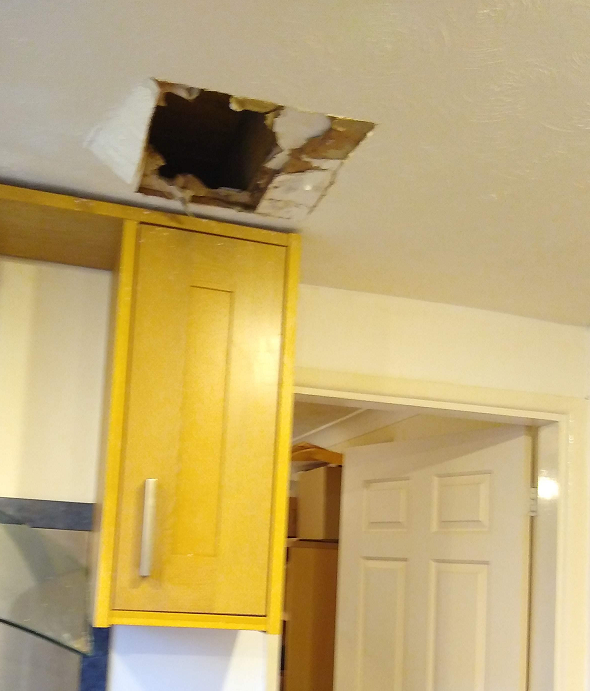
Help - my kitchen ceiling is leaking!


I recently hired a plumber because there was water dripping from my kitchen ceiling and I couldn't find the source!

So I used Google to search for a local emergency plumber (it was a Saturday!) and I found four in my area that had websites. So I went to their websites to check them out and then called all of them at around 8 a.m. on the Saturday morning but my messages went to their answerphone service and no one has called me back since.

Friday, 6 January 2023

Try the new Rescue WinPE from AIOBoot

I just found a interesting new WinPE which consists of a .wim file and a VHD here from the developer of AIOBoot.

It seems to work for Legacy 64-bit and UEFI64 systems. Place the two files in the correct locations as instructed:

\_ISO\WINPE\Win10PE_x64_Boot.wim
\AIO\WinPE\Win10PE_x64_Data.vhd

It claims to be semi-persistent as the “Program Files”, “ProgramData” and “Users” folders in drive X: are moved to drive Y: and data written to these folders and Y: drive will be saved.

Personal settings, time zone, country and region, region format, desktop shortcuts, etc. are also saved.

Desktop shortcuts, pinned apps on the Taskbar, recently used apps are also saved.

It seems to have a few issues with localisaton, etc. and Papps requires network access, etc. but it is an interesting approach as you can install files and programs to the VHD.


Thursday, 5 January 2023

Run grub4dos commands from the Ventoy (or any grub2) menu system

Ventoy is based on grub2 and although it is very good at booting most legacy payloads, it is not that good at booting some DOS floppy images and some other legacy BIOS payloads.

If you need to boot using grub4dos, you can define your own grub2 external user menu (\ventoy\ventoy_grub.cfg) which can be run from Ventoy by pressing F6 in the Ventoy menu system.

My eBook 'Getting started with Ventoy' gives a few examples of how to do this.

Monday, 2 January 2023

Easy2Boot v2.19 released

Changes to E2B v2.19 (Jan 2 2023 version):
  • New grub4dos /grldr to fix changing wallpaper bmp/jpg whilst animation is running in background.
  • Revise E2B Launcher.exe to add ‘Download and Update E2B’.
  • Update some files - hotkey utility, Add_Ventoy.cmd, CheckForUpdate.cmd, CreatePersistentFile.sh,Download and Update E2B.cmd also tells user which version is installed on USB drive.
  • Add new INDONESIAN menu language (thanks to mikail)
  • Add ‘+DPMS’ or ‘ – No DPMS’ to default MAIN MENU heading so user can tell which version is installed.
  • Add “\_ISO\docs\E2B Utilities\GetWindowsProductKey.vbs” – run this to get the current Windows system Product Key.