Wednesday, 31 August 2022

eBooks updated

I have revised some of the eBooks to bring them up to date.

Here is a list of the current versions:
  • E2B #1 - Getting started with Easy2Boot_v2.21.pdf
  • E2B #2 - How to install Microsoft Windows using Easy2Boot_v1.9.pdf
  • E2B #3 - How to make a UEFI multi-boot Easy2Boot USB drive using .imgPTN files v1.03.pdf
  • E2B #4 - UEFI-multiboot using the a1ive grub2 File Manager_v1.25.pdf
  • Getting started with Ventoy v1.11 (for Ventoy v1.0.79).pdf
  • Getting started with grub4dos_v1.02.pdf
Just use the download link in your conformation email to download the latest version. All updates are free.

Monday, 29 August 2022

'Ventoy for Easy2Boot' v1.0.79 bugfix for Windows Install ISOs and WinPE ISOs

I found a problem with 'Ventoy for Easy2Boot' v1.0.79 - it does not load a Windows/WINPE ISO as a virtual drive as it seems LongPanda has added an additional check into the code. This means Windows Installs and some WinPEs did not work correctly.

Please update 'Ventoy for Easy2Boot' using the instructions here.

The new version is still called v1.0.79 - so please update even if the cmd file says that you already have v1.0.79 installed.

The \ventoy\vtoyjump64.exe file on Partition 2 should be dated 2022-08-28 after updating to v1.0.79b.


Sunday, 21 August 2022

Ventoy for Easy2Boot v1.0.79 is now fully released

To update to the latest 'Ventoy for Easy2Boot' v1.0.79 just run

\e2b\Update agFM\Update_to_latest_Ventoy_version.cmd

from Partition 2 of the E2B USB drive.

You can run Download and update agFM_v2.cmd to ensure your version of agFM is up to date first.

The .cmd file will also download and update the Ventoy plugin files and copy on a version of VentoyPlugsonE2B.exe that will work on E2B USB drives.


Wednesday, 17 August 2022

Is YouTube getting worse or is it just broken?

I have some YT videos on my YT channel  and I have made comments on some other peoples YT videos, as I am sure many of you have.

For several years, I have noticed that sometimes, I can look through the comments under other peoples YT videos and I will be surprised to see a comment with my name on it but that I did not write. Here is an example:

Tuesday, 16 August 2022

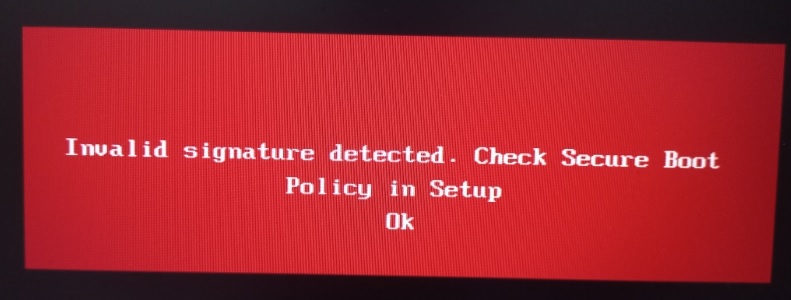
Microsoft just made Secure Boot multibooting more difficult!

After the recent Windows update KB5012170 (August 9, 2022) was released, it seems Ventoy can no longer boot on some systems when Secure boot is enabled. This Windows update may also affect the Kaspersky EFI boot file used by agFM in E2B too.

Summary

This security update makes improvements to Secure Boot DBX for the supported Windows versions listed in the "Applies to" section. Key changes include the following:

Windows devices that has Unified Extensible Firmware Interface (UEFI) based firmware can run with Secure Boot enabled. The Secure Boot Forbidden Signature Database (DBX) prevents UEFI modules from loading. This update adds modules to the DBX.

A security feature bypass vulnerability exists in secure boot. An attacker who successfully exploited the vulnerability might bypass secure boot and load untrusted software.

This security update addresses the vulnerability by adding the signatures of the known vulnerable UEFI modules to the DBX.

KB5012170


Introduction

Ventoy (and the 'official Ventoy' .img files used by agFM) use an .EFI file which allows you to add any file or key onto the BIOS DB 'whitelist' by using MokManager. This basically allow you to secure boot to ANY unsigned .efi file and is therefore a very obvious security risk.

agFM uses a signed Kaspersky EFI boot file which has a security flaw because it allows you to load unsigned grub2 modules. The unsigned grub2 module can then disable the secure boot checks and then allow you to load unsigned .efi bot files.

Microsoft have released various Windows Updates which (if you have UEFI-booted to Windows) will add blacklist entries into the DBx non-volatile RAM of your BIOS so that it will now refuse to Secure Boot from the naughty EFIs that Microsoft should never have signed in the first place!

So this leaves us with a problem (that has been seen coming for several years) - how do we load a multiboot loader/manager such as Ventoy or agFM (which use unsigned grub2). Microsoft will not sign any generic grub2 version because they allow you to load other modules or run dd, etc. and thus potentially hack the secure boot mechanism.

Solutions


Monday, 15 August 2022

E2B v2.16b Beta available

I have added support for the CTRL+F7 hotkey into the E2B menu system.

This hotkey sets the menu system to graphicsmode 3 and text mode.

If you have display issues on some systems and the E2B graphics mode menu system cannot be displayed properly on a particular graphics adaptor or monitor, you may see a 'fuzzy' or 'garbled' or 'corrupt' screen. In this case, hitting Ctrl+F7 may fix the display issue.

Please let me know if this causes you any issues and if you think it is worth keeping this feature in for the next full release.

Friday, 12 August 2022

VentoyPlugson.exe for 'Ventoy for Easy2Boot' available

I have recompiled VentoyPlugson.exe so that it will detect an Easy2Boot drive (although it may also detect other drives too!).

So you can now make a \ventoy\ventoy.json file directly from your E2B USB drive. This will save you having to switch in an 'official' Ventoy Partition 2 image just to configure the ventoy.json file.

Please note this is NOT the official VentoyPlugson.exe and you must make sure you select the correct drive letter if it displays more than one drive! As it only creates a ventoy.json file though, it should not be too harmful if you accidentally choose the wrong drive.

Let me know if you have any issues.

agFM has now been updated to v1.85. The only change is that the cmd file
\e2b\Update agFM\GetLatestVentoyPluginFiles.cmd
now adds a \ventoy\VentoyPlugsonE2B folder to the first partition. You can then run \ventoy\VentoyPlugsonE2B\VentoyPlugsonE2B.exe from that folder.

Action:
1. Run \e2b\Update agFM\Download and update agFM_v2.cmd to update to agFM v1.86
2. Run \e2b\Update agFM\GetLatestVentoyPluginFiles.cmd  to get VentoyPlugsonE2B

Note that 'Ventoy for Easy2Boot' v1.0.79 is also available - see eBook #4 for the download URL and password. It will be released publicly some time in September.

Subscribe for more updates!
--------------------
Thursday, 11 August 2022

Send faxes for free online (no fax machine required)

Recently I had to send a solicitor who was located over 100 miles away, some copies of my ID documents (passport, driving licence, etc.).

Now solicitors do not like receiving emails with attachments as, of course, opening an email attachment carries serious security risks, so they automatically bin all emails with attachments and they wanted me to either send a fax or use snail mail.

However, in the UK, we have just had a warning of a forthcoming  Royal Mail postal service strike and so I was afraid that my documents would be delayed or worse - lost if I posted them! So it seemed that it was best to send them faxes of my ID docs.

My printer does actually have fax capability, but I needed a BT phone socket adaptor for it which I didn't have. So instead I decided to try an online fax service.

Wednesday, 10 August 2022

E2B v2.16a Beta

While testing all the .wim files in Medicat 21.12, I found that the Lockpick.wim file would not Legacy-boot from the Easy2Boot menu system.

All the other .wim files seem to Legacy-boot OK (except for the DiskGenius.wim file which seems to load and briefly display the WinPE Desktop and then immediately reboot on E2B, agFM and Ventoy???).

Easy2Boot 2.15 and previous versions booted a .wim file by using a default boot.sdi and bootmgr file and it creates a BCD dynamically with the name of the boot file in it. For some reason it seems to crash however on the Lockpick.wim file.

So Easy2Boot v2.16a Beta now supports the .wimboot file extension and this will load the  wim file using the wimboot method (derived from the iPXE github project and used by agFM and Ventoy).

Download E2B v2.16a from the 'Latest Betas' folder - https://easy2boot.xyz/download/alternate-download-sites/

QRUN will suggest that you try .wimboot instead of .wim, or you can just give the .wim file a _.wimboot.wim file extension and it will automatically use the wimboot method without prompting you.

e.g.