Sunday, 3 July 2022

You must check these four things on your computer at least once a year

If you have purchased a new computer, perhaps have built your own PC or have a PC/notebook which is over a year old, you should check these things now and at least once a year.

Introduction

Modern computers are able to monitor various temperatures, fan speeds and voltages throughout the system. You can easily download software to display these values (often the BIOS setup/configuration menu system will display them too). Using SMART, we can also find out about the health of our internal disk drives too.

If you have received a new or second-hand system recently, a typical problem is that during transportation, the CPU heatsink may have come loose. This would mean that your CPU will get too hot and when this happens, modern PCs will usually 'throttle back' and go slow to avoid permanent damage to the CPU. 

If you have a computer that is a few years old, the thermal paste between the CPU and the CPU heatsink may have dried out. Again, your CPU may be getting too hot.

Also, if your PC\Notebook is older than a year or so, it may have accumulated dust and cobwebs! This can seriously affect the air flow through the system and can thus cause the hard drives and CPU to overheat.

If you have overclocked your system, you will need to be particularly careful, because you are probably running it at its maximum performance capabilities - any overheating may cause damage or a system crash!

Some monitoring programs which I recommend you to try are:
Saturday, 2 July 2022

How to fix Windows Startup program errors (e.g. HP printer drivers/programs)

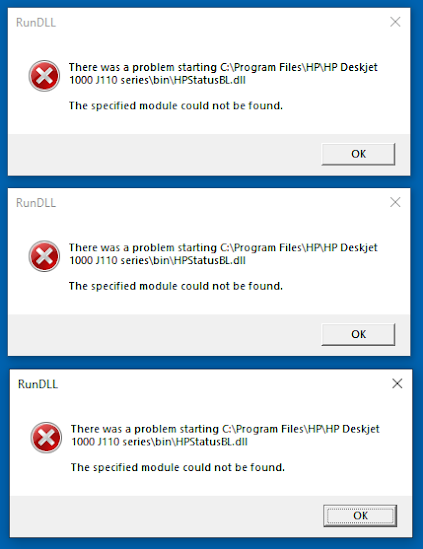
 After uninstalling some programs from your Windows system, you may find that as soon as you log in to your Windows account, you see some Windows dialog boxes which are reporting missing programs or DLL files, etc.


This is usually because the Uninstaller has forgotten to remove all of the programs or services that it had originally installed and configured to run on startup. There are two types of mechanisms which could be causing this:

Thursday, 30 June 2022

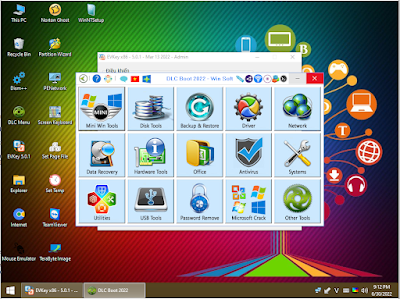
agFM v1.81 released plus E2B Beta v2.14h (with DLC Boot 2022 v4.0/4.1 ISO support)

agFM v1.81 is now released and supports the latest DLC Boot 2022 ISO.

E2B v2.14i Beta and v2.15 is also available which also supports the June 2022 DLC ISO and has UDF ISO bugfix in grub4dos.

For DLCBoot 2022 ISO UEFI64 booting from agFM please use agFM v1.88 or later.


Monday, 27 June 2022

easy2boot.com now redirects to easy2boot.xyz

I have set up a redirect from the old .com site to the new WordPress easy2boot.xyz home page now and some of the old .com URLs will even redirect to the equivalent page on the xyz site!

Please let me know if you find any bad links!


Sunday, 26 June 2022

How to make $$$ for zero cost while you sleep!

Do you have some knowledge, information, know some 'secrets', hints and tips, great gluten-free recipes, good websites/blogs/social media sites/forums, etc. which may be valuable to others, then why not write some eBooks. Although I sell an eBook called 'How to make $1000 a month from the internet' for just $3 in my eBook store, I am going to show you how easy it is to sell eBooks world-wide for absolutely no cost and very little effort once it has been written and is set up for sale.

The great thing about eBooks is that it is passive selling. Once it is available for sale you just sit back - everything (sales, delivery, payment) is automatic and it is very simple to set up too!

If eBooks aren't your thing, musicians can sell their own music files, photographers can sell their photos and artists can sell their graphics downloads. You can make and sell courses and coaching products on a subscription basis too (typically using Zoom, setting milestones, etc.).

Wednesday, 22 June 2022

Legacy-booting the RedHat Trial Beta RHEL 9 ISO (registration issue)

 A user reported that the trial version of RedHat RHEL 9 did not seem to work correctly when booted from an ISO file using E2B, agFM or Ventoy.

All seemed OK, except that the installer GUI did not seem to pick up the trial licence information and it required the user to register online using their RedHat login credentials before it would allow you to proceed...


To work around this issue, it was necessary to ensure that the legacy MBR Partition 4 Type number was not set to 0 so that the Linux OS would mount the ISO mapped to Partition 4 and would see the licence files.

E2B 2.14e Beta thus supports a new .iso83 file extension which works around this issue.

For more details see here and the Forum thread here.

Sunday, 19 June 2022

Fix for the KINGS_OVERKILL USB drive not booting to the AMD files on Partition 3

I have updated the previous article with instructions on how to boot to the AMD test files on Partition 3 of the KINGS_OVERKILL USB drive.

So after fixing the problems, you can Legacy and UEFI-boot to the AMD graphics RAM test programs as well as the two nVidia RTX test images.

Please refer to the previous article here.

Adding the AMD files to an E2B drive

It is possible to add an image of the AMD large (60GB) ext4 Partition 3 to an E2B USB drive as a .imgPTNREP3 file.

Please contact me if you want a download link for my 63GB TEST_AMD_GPU_PTN3.imgPTNREP3 file (split into 17 x 2GB 7Zip files).

Just for interest sake - I used RMPrepUSB to make a working image as follows: I first ensured that the original large multipartition KINGS_OVERKILL USB drive would boot to Partition 3 correctly (Legacy and UEFI). Then I used RMPrepUSB - Drive>File button to capture the whole of Partition 3 as a single file (a 60GB file!). Start P3, End P3, file start 0.

How to add the AMD image file to your E2B USB drive

1. First create an E2B USB drive using a 200GB or larger USB drive. You should add agFM and Ventoy for Easy2Boot too. Use the custom gear-wheel button to make the E2B drive and be sure to create a large (100GB) NTFS partition 1, a 10+ GB FAT32 partition 2 and a large 100GB+ NTFS partition 3.

2. Copy the downloaded image file to E2B Partition 3 (NTFS) and name it something like TEST_AMD_GPU_PTN3.imgPTNREP3. 

3. Defragment the .imgptnrep3 file.

Here is the NTFS Partition 3 on my E2B USB drive (the large file must be defragmented - I used Defraggler for this)...

Saturday, 18 June 2022

Run nVidia/AMD GPU graphics memory tests from an Easy2Boot drive

I recently came across a YouTube video which booted from a large dedicated USB drive to run Nvidia and AMD diagnostics using MATS (Memory Automated Test System) and MODS (Modular Diagnostic Software).

Nvidia has a proprietary software tool called MODS (Nvidia MOdular Diagnostic Software) which has a standalone VRAM test called MATS. How to use MATS can be found below.

Note: To get the Kings_Overkill USB drive fully working - scroll down!

Also see this article.

To make a new bootable USB HDD with all three test images, see 'How to make a MODS and MATS USB drive' below.


The USB he created comprised of three separate Primary MBR partitions with each partition containing a separate set of bootable files:

  • Partition 1: nVidia RTX 30xx Series And Before 5GB
  • Partition 2: nVidia RTX 20xx, GTX 16xx/10xx/9xx/7xx/6xx/5xx Series And Before 5GB
  • Partition 3: AMD RX4xx/RX5xx/RXVEGA64/R7/R9 Series/HD7xxx 60GB

I made a separate USB drive from the .rar files from the instructions in the video but for some reason the ext4 Partition 3 seems to be corrupt on my drive and would not boot at all :-(.

However I could legacy boot and UEFI64-boot OK to Partitions 1 and 2 of the new USB drive.

I wanted to add some sort of bootable images of these to my E2B drive so I used RMPrepUSB - File - Make grub4dos ISO file function to make a bootable ISO. However, the ISO file only worked when Legacy booting (it hung on a UEFI boot as did Ventoy).

Friday, 17 June 2022

XMLtoE2B.exe v2.0.52 with 'skip TPM check for Win11' now available

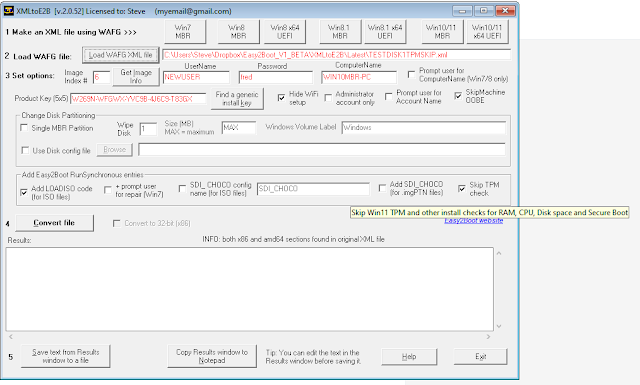
I have added a 'Skip TPM checks' button to XMLtoE2B.exe so that you can easily make an XML file for Windows 11 which will not check for a TPM, free disk space, CPU, RAM capacity or a SecureBoot.


The new .exe file is in the Alternate Downloads - Latest Betas folder here.
A slightly tweaked version has now been fully released.

Let me know if you find any issues!

See my earlier article if you don't know what this is.

Wednesday, 15 June 2022

Kon-Boot 4.1 update released

A Kon-Boot 4.1 update is now available from U-Lead.


Kon-Boot is currently the only solution worldwide I am aware of that can bypass Windows 10/Windows 11 online account passwords and does not modify the Windows files (though you can use the E2B UtilMan hack to do a similar job).

 4.1 Main updates:
  • Updates for  Windows 10 / Windows 11

  • Fixed 0xc0000001 boot error issue on newest Windows 11 release

  • Updates for macOS Monterey 12.4

  • Updates for legacy BIOS loader

  • Installer updates


Note that the Kon-Boot EFI boot file is obviously not signed by Microsoft so Secure Boot to a Kon-Boot USB drive is usually not possible, however you can add the Kon-Boot files to an E2B drive and then Secure Boot to agFM and from that menu run Kon-Boot. See a previous blog for more details.