This version has a new Beta version of an 'E2B Launcher.exe' 32-bit Windows application which you can find in the \_ISO\docs\E2B Utilities\Launcher folder.
Download from the Latest Betas folder here.

This version has a new Beta version of an 'E2B Launcher.exe' 32-bit Windows application which you can find in the \_ISO\docs\E2B Utilities\Launcher folder.
Download from the Latest Betas folder here.
Version 1.66 and 1.67 had a bug when booting Legacy Linux and other non-windows ISOs using the .isodef, isomap and .isomem options in agFM. This was due to a1ive changing his code and removing the MAP file from his file structure!

Use the \e2b\Update agFM batch file to update to the new version.
I was asked today for a grub2 menu which would protect the E2B USB drive from being cloned onto another drive.
The lines below can be added into your startup_menu.txt file.
It checks the total drive capacity of your E2B USB drive - if it is not as expected, then it displays a graphics file (candle in this case) and then prompts you to enter a password (3 chances). If the user does not know the password, then it loads a 'guest' menu, but it could just as easily shutdown or reboot the PC.

You can display any graphics file you like (.png, .jpg, .bpm) and you can change the messages, etc. as you wish.
I have just updated eBook #4. You can get the update for free by using the link in your original Payhip email that you received when you first purchased the eBook.
I also found an old bug in the .isopersist code in agFM, so I have now updated agFM to v1.67 today. The problem was that the *-rw persistence file would only work if it was in the root of the USB drive. Now it can be in either the root or the same folder as the Linux ISO.
Easy2Boot and agFM can boot WinPE-based ISOs easily, however many of these ISOs require access to files on the 'DVD' drive once they have booted to WinPE.
Since these files are inside the ISO file on the USB drive, these extra utilities cannot be found by the miniWindows environment and you may find some Desktop and StartMenu items missing!
E2B and agFM can make this work however by using that fact that most WinPE's are built using WinBuilder which typically contain this extra startup code. When a WinPE made by WinBuilder boots, it looks for a volume containing a .ini file in the root (e.g. \WIN10PESE.ini) which specifies the path of an ISO file. WinPE will then find that ISO file and auto-mount it as a virtual DVD drive so that WinPE can now access the files within the ISO.
WIN10PESE.ini
E2B and agFM will modify these .ini files before booting the ISO (that is one reason why a write-enabled USB drive is required). The ISO filename should not contain spaces because some versions of WinBuilder cannot cope with spaces in filenames.
However, this only works if the WinPE contains this special WinBuilder startup code which looks for the special WinBuilder .ini file.
E2B and agFM also modify the \AutoUnattend.xml file in the root of the E2B USB drive - this file is automatically run if the ISO is a Windows Install ISO (but it is not usually run by WinPE ISOs).

Unfortunately, some WinPE ISOs do not contain this special startup code (e.g. c't Emergency Windows 2021). There are a number of ways around this:
Changes from v1.65 are:
agFM Beta10 adds a new F10 hotkey function (new hidden feature).
If you press F10 in a grubfm menu, then it will completely reload grub2.
You may find this useful if you run an ISO or some other payload file and grubfm loses the gfxmenu system and just displays a black-and-white text menu. If you then press F10 then the whole agFM boot file will be reloaded thus saving you having to reboot. Since some servers can take 5 minutes to reboot, you might find this useful.
The actual code is compiled within agFM (in global.sh), but if you are interested, you can add a menuentry to your own menu system as shown below:
Please test latest version 1.66 Beta7 as I hope to make it the new release version in a day or so.
See OneDrive - Latest Betas folder for the download.
Please don't just wait for it to be released before trying it. It is easy to test it by simply extracting the files to the 2nd partition. If you want to go back to the old v1.65 then simply click on \e2b\Update agFM\Download and update agFM_v2.cmd.
Changes from v1.65 are:
Todays version in 'Latest Betas' will automatically download and add 'Ventoy for Easy2boot' when you double-click the \e2b\Update agFM\Update_to_latest_Ventoy_version.cmd file.
The current version is Ventoy v1.0.29 but is slightly modified to run on E2B.
See the Ventoy page on the E2B site for details and a suggested ventoy.json file...

{
"control_uefi": [
{ "VTOY_DEFAULT_MENU_MODE": "1" },
{ "VTOY_FILT_DOT_UNDERSCORE_FILE": "0" },
{ "VTOY_DEFAULT_SEARCH_ROOT": "/_ISO" },
{ "VTOY_MENU_TIMEOUT": "5" },
{ "VTOY_DEFAULT_IMAGE": "/_ISO/LINUX/ubuntu-18.10-desktop-amd64.iso" }
],
"control_legacy": [
{ "VTOY_DEFAULT_MENU_MODE": "1" },
{ "VTOY_FILT_DOT_UNDERSCORE_FILE": "0" },
{ "VTOY_DEFAULT_SEARCH_ROOT": "/_ISO" },
{ "VTOY_MENU_TIMEOUT": "10" },
{ "VTOY_DEFAULT_IMAGE": "/_ISO/LINUX/linuxmint-20-cinnamon-64bit.iso" }
]
}
If you often need to gain access to a customers Windows account (local or online account) or MAC OS account but don't know the account password, then Kon-Boot is the quickest and simplest way to gain access (MBR or UEFI).
Today you can get 25% off KonBoot by using this link,
Kon-Boot can now work on larger USB drives as well as small USB Flash drives, so you can install Kon-Boot onto any USB drive and then add E2B to the same drive. More details here.
P.S. Black Friday Samsung 860 500GB SSD #ad on offer at Amazon for 47% off (over 60% off 2TB version!). If your laptop does not have an SSD hard drive, this will be the best saving you've ever made as you won't have to buy a new laptop for another few years at least! Why not give them as Christmas present and help your family upgrade their own laptops over the Christmas holidays?
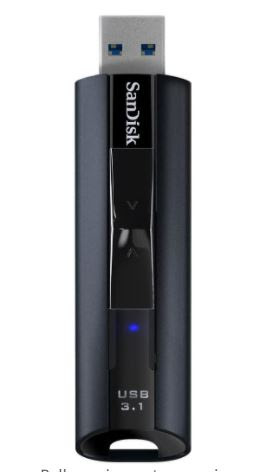
Hurry! 128GB SanDisk Extreme Pro (#ad) USB 3 Flash drive for only £30 !!! One of the fastest flash drives you can get - ideal for E2B!
Note: This is the superfast PRO version, not the slow, budget GO version (which is not recommended!).Check out the SD card discounts too...