Steve's blog about RMPrepUSB, Easy2Boot and USB booting and sometimes other stuff too! Don't forget to Subscribe! PDF eBooks here
Visit www.rmprepusb.com for over 140 Tutorials on USB booting or www.easy2boot.xyz for a unique USB multiboot solution.
Monday, 5 September 2022
Major bank security loophole exposed - don't be a victim - use this simple fix!
Saturday, 3 September 2022
E2B v2.16f Beta
Current changes in 2.16f are:
- Add .wimboot file extension support. Use xxxxx_.wimboot.wim to make E2B boot using iPXE wimboot method instead of NTBOOT and bootmgr\BCD.
- Add Ctrl+F7 hotkey to switch display to text mode. Use Ctrl+F8 to reload menu in default mode.
- Add Alt+F7 hotkey to switch display to 1024×768 mode. Use Ctrl+F8 to reload menu in default mode.
- New SWITCH_E2B.exe to fix not switching if partition 4 has start/size parameters but is Type 0
- New \_ISO\WINDOWS\SVR2022 folder added for Server 2022 with XML and KEY files.
- F1 ENGlish help text file updated.
Wednesday, 31 August 2022
eBooks updated
- E2B #1 - Getting started with Easy2Boot_v2.21.pdf
- E2B #2 - How to install Microsoft Windows using Easy2Boot_v1.9.pdf
- E2B #3 - How to make a UEFI multi-boot Easy2Boot USB drive using .imgPTN files v1.03.pdf
- E2B #4 - UEFI-multiboot using the a1ive grub2 File Manager_v1.25.pdf
- Getting started with Ventoy v1.11 (for Ventoy v1.0.79).pdf
- Getting started with grub4dos_v1.02.pdf
Monday, 29 August 2022
'Ventoy for Easy2Boot' v1.0.79 bugfix for Windows Install ISOs and WinPE ISOs
I found a problem with 'Ventoy for Easy2Boot' v1.0.79 - it does not load a Windows/WINPE ISO as a virtual drive as it seems LongPanda has added an additional check into the code. This means Windows Installs and some WinPEs did not work correctly.
Please update 'Ventoy for Easy2Boot' using the instructions here.
The new version is still called v1.0.79 - so please update even if the cmd file says that you already have v1.0.79 installed.
The \ventoy\vtoyjump64.exe file on Partition 2 should be dated 2022-08-28 after updating to v1.0.79b.
Thursday, 25 August 2022
Quick! - check out the Amazon 'End of Summer' sale bargains
- Amazon Echo Dot (4th gen) for 54% off!
- Fire TV Stick with 38% off.
- Sandisk Extreme Pro 512GB USB 3.2 with 37% off.
- 20%-50% off laptops - e.g. LG gram Laptop 16Z90Q - 16 Inch, Intel Evo Core i5 - 12th Gen, 80Wh Battery, (2560 x 1600 px), 16GB RAM, 512 GB SSD Memory, Windows 11 OS
- Up to 38% off Crucial Memory modules
- 1TB 2.5" SATA SSD 23% off
- Large discounts in Kitchen Electrical appliances (some -38%)
Sunday, 21 August 2022
Ventoy for Easy2Boot v1.0.79 is now fully released
To update to the latest 'Ventoy for Easy2Boot' v1.0.79 just run
\e2b\Update agFM\Update_to_latest_Ventoy_version.cmd
from Partition 2 of the E2B USB drive.
You can run Download and update agFM_v2.cmd to ensure your version of agFM is up to date first.
The .cmd file will also download and update the Ventoy plugin files and copy on a version of VentoyPlugsonE2B.exe that will work on E2B USB drives.
Wednesday, 17 August 2022
Is YouTube getting worse or is it just broken?
Tuesday, 16 August 2022
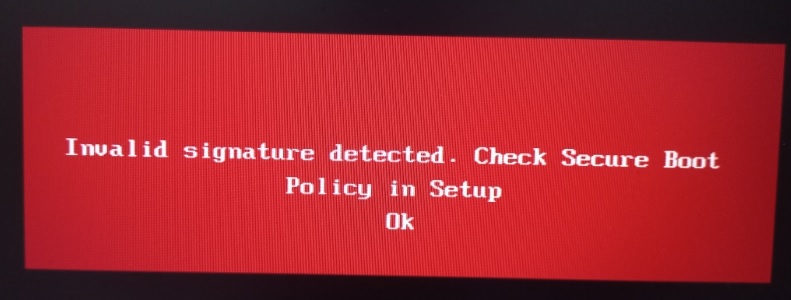
Microsoft just made Secure Boot multibooting more difficult!
Summary
This security update makes improvements to Secure Boot DBX for the supported Windows versions listed in the "Applies to" section. Key changes include the following:Windows devices that has Unified Extensible Firmware Interface (UEFI) based firmware can run with Secure Boot enabled. The Secure Boot Forbidden Signature Database (DBX) prevents UEFI modules from loading. This update adds modules to the DBX.
A security feature bypass vulnerability exists in secure boot. An attacker who successfully exploited the vulnerability might bypass secure boot and load untrusted software.
This security update addresses the vulnerability by adding the signatures of the known vulnerable UEFI modules to the DBX.
KB5012170
Introduction
Solutions
Monday, 15 August 2022
E2B v2.16b Beta available
I have added support for the CTRL+F7 hotkey into the E2B menu system.
This hotkey sets the menu system to graphicsmode 3 and text mode.
If you have display issues on some systems and the E2B graphics mode menu system cannot be displayed properly on a particular graphics adaptor or monitor, you may see a 'fuzzy' or 'garbled' or 'corrupt' screen. In this case, hitting Ctrl+F7 may fix the display issue.
Please let me know if this causes you any issues and if you think it is worth keeping this feature in for the next full release.
Friday, 12 August 2022
VentoyPlugson.exe for 'Ventoy for Easy2Boot' available
\e2b\Update agFM\GetLatestVentoyPluginFiles.cmd
now adds a \ventoy\VentoyPlugsonE2B folder to the first partition. You can then run \ventoy\VentoyPlugsonE2B\VentoyPlugsonE2B.exe from that folder.