Thursday, 11 June 2020

Kon-Boot v3.5 now allows us to use larger E2B USB drives

If you buy a licensed version of Kon-Boot v3.5, you can now use it with large USB drives (previously we were limited to drives of 16GB or less).

This means you can now licence a 128GB or 256GB SanDisk USB E2B flash drive or even a 2TB USB Hard Drive.

Once you have installed Kon-Boot, you can backup the files, re-format the drive as an E2B drive and then copy back on the special encrypted USB-drive specific EFI boot file made by the Kon-Boot .exe install process.

If you have already purchased a Kon-Boot licence and have activated it on a small USB flash drive (<16GB) then you cannot switch the licence to a different USB drive - you must purchase a new licence for each drive you want to use Kon-Boot with because the USB Vendor, Product ID and Serial Number of the USB drive is encrypted into the boot file the first time you make a Kon-Boot USB drive. The same USB drive values are recorded on their server for each unique licence number.

Details of how to add the licensed Kon-Boot UEFI boot files to an E2B v2 USB drive are in eBook #4.

You can instead just make a FAT32 .imgPTN or .imgPTN23 file from the files on the Kon-Boot USB drive. Make sure the volume name is KONBOOT once it is switched-in.

Note: E2B+agFM allows you to Secure Boot without needing to purchase the more expensive 'commercial' Kon-Boot licence. However, Windows 10 (UEFI) online account bypass support is only included with the full Kon-Boot commercial licence.

If you see this, the licence details did not match with the USB drive's ID!

Note: For best compatibility, the Kon-Boot files should be within 128 GiB from the start of the USB drive.

Monday, 8 June 2020

agFM v1.55 available

Changes

  1. Remove HDCLONE menu from startup_default.cfg menu
  2. Improve 'Restore E2B partitions' detection menu entry so does not appear if no valid backup
  3. Update to latest a1ive grub2\grubfm version
To download and update run \e2b\Update agFM\Download and update agFM_v2.cmd from the second agFM partition.

IODD Mini SSD 

For simple ISO and VHD booting, this neat little USB 3 SSD AES256-bit encrypted drive is hard to beat! Just select the ISO\VHD on the display and boot. VHD files can be set to emulate a fixed or removable USB drive and you can write-protect it too if you wish. You can also set the whole SSD drive in the same way, so you can have a 512GB Removable USB 3 SSD drive or a write-protected 512GB Fixed disk or any combination thereof.


P.S. I just received an IODD Mini 512GB SSD drive from IODD for evaluation. So please let me know if there is anything in particular you would like me to cover. So far I am impressed! It is quite small, fast and seems to work well.

Tuesday, 2 June 2020

E2B v2.04 and agFM v1.54 released

E2B v2.04
1. Bugfix for Windows Install + UEFI agFM imdisk error
2. Danish keyboard scan file added
3. Strelec ISO direct boot (.isowin)
4. Support .isoventoy file extension
5. Update E2B now updates agFM partition

a1ive agFM v1.52
1. Support .isoventoy file extension
2. Update to latest grubfm version
3. WinPE ISO files have extra 'choose wim' boot option

a1ive agFM v1.53
1. Bugfix - Setup.exe restarts if parentheses (  ) in filename of Windows Install ISO - now fixed

a1ive agFM v1.54
1. Bugfix - .imgptn files not listed if Secondary Menu option enabled in F4 menu

https://www.easy2boot.com/download/


Monday, 1 June 2020

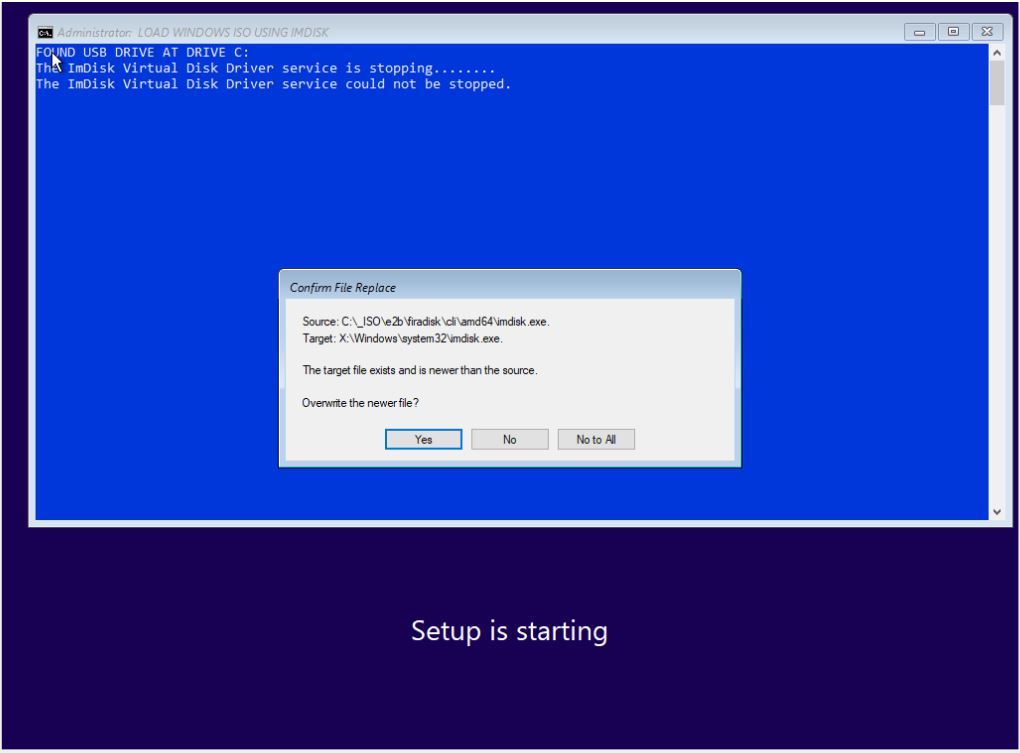
E2B v2.04d fixes 'imdisk' bug when installing Windows from agFM

If you are using agFM v1.50 or later and are using a Removable USB drive for E2B, then you will find that the Windows Install from ISO function using agFM stops with an 'imdisk' error if you also use an XML file.


This is due to agFM actually using ImDisk to mount the ISO now (since v1.50) and so the E2B cmd file tries to install imdisk again.

If you are using a USB Fixed disk for E2B then you won't see this error.

This bug is fixed if you update to E2B v2.04d.

I will release E2B v2.04 very soon, so please let me know if you find any issues with it.

Saturday, 30 May 2020

E2B eBooks special offer ends tomorrow - SORRY - TOO LATE NOW!


Some of the eBooks were previously priced at $6.99, $7 and $10 but for the month of May the price was reduced to just $5 each. If you buy more than one eBook you get a 10% reduction on all eBooks in your Basket too.

This 'Corona' special offer ends tomorrow when the price will go up from $5 each to $6.99 each.

P.S. There are a few reviews about the eBooks on the GuestBook page if you want to see if they might be useful to you (and I didn't pay them to write that - honest!).

Friday, 29 May 2020

agFM v1.51 for E2B officially released

See previous blog article for details.
To update, you can now run  \e2b\Update agFM\Download and update agFM_v2.cmd.

For best results, you should also download the latest Beta of E2B.

agFM eBook #4 v1.13 is now available (updated today).

Wednesday, 27 May 2020

agFM v1.51v2 Beta now available

Download from Alternate Download site as usual.

This version adds the ability to use a file with a .imgptnREP3 file extension (file must be on partition 3).

Changes from 1.50 (v1.51v2 changes in orange)
  • New search (F) button added (e.g. search for file types such a .iso, .wim). 
  • Boot Windows ISO option now runs X:\Setup.exe so that Repair option is offered if no XML file is specified. 
  • Allow use of file extension override suffixes (e.g. Medicat v18.10 stable_.isowin.iso) so extension can be kept as .iso but it will immediately boot with no secondary menu. 
  • Support _.winntsetup.iso file extension suffix for booting to Windows PE from Install ISO and directly loading the ISO into WinNTSetup.exe. 
  • Danish language. 
  • Ventoy boot option for ISOs added
  • Bugfix for Auxilliary partition image file not detected as hfs type 0xAF (e.g. MacOS..imgPTN23+MacOS.), 
  • .imgPTNrep3 file extension now supported (file must be in partition 3). 
  • Add a check to prevent one .imgPTN* file from being used if a .imgPTN* file has already been switched in (thus preventing the backup MBR from being overwritten). 
  • The 'Restore E2B Partitions' menu entry in the startup_default.cfg menu is now displayed whenever the MBR partition table contains a 'switched-in' .imgPTN image.

The .imgptnREP3 file extension allows you to replace partition 3 with any other image file.

I extracted the 10GB 3.hfs file from a Niresh Catalina.dmg file and renamed it.
When it is switched in to replace partition 3, I can use the agFM menu to boot from it (use F3) - you should also be able to directly boot to it from a Mac using its Clover boot manager.


You can thus  UEFI-install any MacOS from one E2B drive.

Please feedback any issues/successes/failures!

Saturday, 23 May 2020

agFM v.1.51v with Ventoy now available

A1ive has now added Ventoy v1.0.10 to the main build of agFM.

You can download the latest beta v1.51v from here.

The advantage of Ventoy is that it can work from a write-protected drive (but agFM requires writeable media for some functions) and the ISO files do not need to be made contiguous. It may also boot faster. The disadvantage is that it is relatively young and may have quite a few compatibility issues.

I have found that Ventoy does not seem to like UEFI-booting under VirtualBox, so if you experience any issues with the Ventoy boot option for ISOs, please test it on a real system.

Please note: There are three 'SKUs' of Ventoy v1.0.10:

1. Official Ventoy release from Ventoy website
2. Ventoy as added to A1ive grubfm
3. Ventoy as added to E2B+agFM

If you experience any issues on a real system with Ventoy, please first test by renaming \boot\grubfm\config on the agFM partition so that the E2B+agFM modifications are suppressed and thus you are testing the pure a1ive version of Ventoy.

Before reporting any Ventoy issues it is best to make an official Ventoy USB drive and re-test the same ISO on that and then report the issue to Ventoy via reboot.pro. Make sure you clearly state what version you have tested (Ventoy USB drive, or A1ive Ventoy (no config file), or E2B agFM Ventoy) and also how you booted (MBR or UEFI) + make\model of target system.


Friday, 22 May 2020

New agFM v1.51 Beta and E2B v2.04c Beta available

I have made some tweaks to agFM so that it can now directly boot Strelec, DLCBoot, HBCDPE, Bob Omb's PE, Gandalf PE and Medicat ISOs - no secondary menu is presented if you use file extension override suffixes.

agFM now understands some file extension override suffixes (similar to E2B feature) - e.g.  filename_.override.iso

The special suffix tells E2B\agFM to boot it as if it had that file extension. This allows the file to still keep it's .iso file extension which is needed by some WinPEs to make them work correctly.

· Medicat v18.10 stable_.isowin64.iso
· Bob Omb's WinPE_.isomap64.iso
· DLCBoot WinPE_.isohw.iso
· Windows 10 x64 Eng_.winntsetup.iso

Currently isowin, isomap, isodef, isodefault, isoagfm, isoloop, isohw, isope and winntsetup are supported - with or without the four special suffixes 64, 32, 3GB, 4GB.


agFM v.1.51 
  • New search (F) button added (e.g. search for file types such a .iso, .wim from current folder). 
  • Boot Windows ISO option now runs X:\Setup.exe so that the Windows Repair option is offered if no XML file is specified. 
  • Allow use of file extension override suffixes (e.g. Medicat v18.10 stable_.isowin.iso) so extension can be kept as .iso but it will immediately boot with no secondary menu. 
  • Support _.winntsetup.iso file extension suffix for booting to Windows PE from Install ISO and directly loading the ISO into WinNTSetup.exe.
This should be used with E2B v2.04c Beta.

Check the Alternate Download site for these new versions (see top-left sidebar).

Full details are in eBook #4 on agFM v1.12 which I have just updated so you can download the new versions now.


Monday, 18 May 2020

E2B v2.04b Beta includes Danish language and keyboard + better Strelec ISO support

v2.04b Beta now includes the Danish language as an option.

If you want to boot to a Strelec ISO, try the extension .isowin. This should allow you to boot to the two Win10 WinPEs using the Easy2Boot menu system or using the agFM menu system.