Wednesday, 15 June 2022

Installing Windows 11 offline and creating a local account - is it possible?

The Windows 11 setup procedure now insists that you are connected to the internet and that you must use an online account rather than a local account. However, there are some ways around this:

Setup + Ethernet connection to internet

Win11 Setup will see that you have an internet connection and ask for your account email address and password. However, if you enter an invalid password with Windows Pro or Home, it will fail and then allow you to create a local account. e.g. test@test.com or a@b.com with any password.

Setup + WiFi only

Win11 Setup will insist that you connect to a WiFi network if it cannot detect an internet connection via Ethernet. If you connect to the internet by WiFi by entering the WiFi SSD credentials, you can also use the same trick of using an invalid online account + password or if installing Win11 Home see the next section.

Setup + no internet

If you do not want to or you cannot connect to a WiFi router, you can use the oobe bypass method as in this Britec video.

The other alternative is that you use an unattend XML file which will automatically create a local account for you. You can edit the XML file before you start so it uses the user name that you want (and can also force it to install Pro even if it was OEM registered for Home). The XML file can also skip the TPM and other checks that Win11 insists on.

In E2B v2.14cBeta (Alternative Downloads - Latest Betas folder), I have added some XML files which you may find useful.

WIN11_LOCAL_ACCOUNT_USER1_SKIP_CHECKS.xml   (no product key - Setup will ask)
WIN11_LOCAL_ACCOUNT_USER1_SKIP_CHECKS_PRO.xml
WIN11_LOCAL_ACCOUNT_USER1_SKIP_CHECKS_HOME.xml

Only the default settings will be used. The install is almost fully automated.

You can make an XML file with your own settings using WAFG (and XMLtoE2B.exe - optional) if you wish (see here for more details). The same XML files can be used by E2B, agFM, grubfm and Ventoy.

For more information on fully automating Windows installations see eBook #2.


E2B v2.14dBeta now has XML files which will allow the user to create either a local OR an online account during Setup without having to specify the name of the user account within the XML file. It also bypasses the TPM checks.
Tuesday, 14 June 2022

agFM update v1.80 available

 1.80 2022-05-13

  • Update Make_Latest_Ventoy_Partition_Image.cmd to allow debug CI versions of Ventoy to be used to make new Ventoy partition images. 
  • A few new sample .cfg files were added for Porteus+persistence and fossapup+persistence.

Updated eBooks now available

The eBooks below in red have been updated.

If you have already purchased an older version just use the link in the email that was sent to you from Payhip to get the new version for free. You do not need to pay to get the latest revision.

eBooks store is here. Most are $5 each.

The latest versions of the eBooks are:
  • E2B #1: How to make a multiboot USB drive using Easy2Boot v2.21
  • E2B #2: How to install Microsoft Windows using Easy2Boot v1.9
  • E2B #3: How to make a UEFI multi-boot Easy2Boot USB drive v1.02
  • E2B #4: UEFI-multiboot using the a1ive grub2 File Manager v1.23
  • Getting started with Ventoy v1.09  (for Ventoy 1.0.76)
  • Getting started with grub4dos v1.01
  • How to make $1000 a month from the Internet v1.08  - now only $3

Some of the eBooks product pages have reader reviews under the descriptions at the bottom of the page.

Tuesday, 7 June 2022

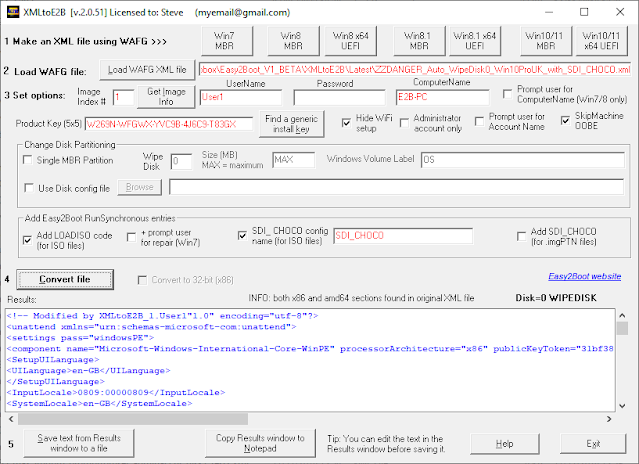
XMLtoE2B v2.0.51 is now available

XMLtoE2B.exe is a small Windows utility that helps you to make a Windows Install XML file to fully automate a Windows install from an E2B USB drive or from a grubfm\agFM\Ventoy USB drive.

Using multiple SDI_CHOCO config sets, you can automate the online or offline installation of drivers, applications and Windows updates. If a new Windows ISO is released by Microsoft, simple copy the new ISO file to your E2B USB drive!

An updated version of XMLtoE2B is now available. If you have a licence file for the old version, it will also work with the new version.

Note that without a licence file you will not be able to save XML files. If you have purchased 3 or more E2B eBooks then please contact me for a complimentary licence (provide name and email address).

Version changes

v2.0.51 2022-06-07

  • Check if ComputerName is same as UserName (illegal)
  • Change website URL to easy2boot.xyz
  • Change Win10 buttons to 'WIn10/11'.

For details on how to use XMLtoE2B to easily and quickly modify your XML files for automated Windows installs, see here

eBook #2 contains detailed exercises on how to set up fully automated Windows installs.

Note: New Beta is v2.0.52 (.exe file only) and includes a 'Skip TPM checks' tick box for Win11 XML files.

Saturday, 4 June 2022

E2B DPMS 2.14b Beta available (with Toshiba Satellite C55D-C XP32 disk driver fix)

A user had a problem installing XP 32-bit onto a 2015 Toshiba Satellite C55D-C  laptop containing a 128GB M.2 SATA SSD card. XP Setup did not detect the internal SSD even though it appeared to detect, identify and load a mass storage driver for the PCI Id PCI/VEN_1022&DEV_7801&SUBSYS_F8451179 correctly.

It seems the driver in the DPMS driver pack was not correct and so E2B DPMS v2.14b Beta now contains what I hope is the correct driver which appears to now work on the users Tosh laptop.

The new E2B DPMS v2.14b now uses the AMD AHCI Compatible RAID SB8xx/SB9xx (WXP-RAID) driver,  so if  you cannot detect a hard drive (but could with a previous version of E2B), please let me know that I have broken something!

The download is available from the Alternate Download sites here (Latest Betas folder).


Tuesday, 31 May 2022

Ventoy 1.0.75 now released with an improved Secure Boot EFI update plus other fixes

You can add partition images of the latest Ventoy release to your E2B USB drive (see here for details) or if you have a Ventoy USB drive, you can update it using the Ventoy download's Update button (and then add E2B if you like for extra legacy support).

IMPORTANT: If you have already switched in a Ventoy .img file you MUST NOT use the Ventoy utility to update it - otherwise it will destroy the E2B USB data and you will not be able to switch E2B\agFM back in! Instead, restore the USB drive to an E2B\agFM drive first, then re-make the new Ventoy .img files as directed (see here for details) .

If you had problems with Ventoy Secure Boot on some systems, the new version may fix that.

Monday, 30 May 2022

RMPrepUSB v2.1.746 released

This updated version contains a small update to RMPartUSB to fix a problem with some Model strings reported by some USB drive M.2 enclosures.

Download from Fosshub here (the.exe is a self-extracting exe file but it may cause false-positive antivirus warnings).

Saturday, 28 May 2022

E2B v2.14a Beta available

A small bug has been found in RMPartUSB which causes a problem when trying to create an E2B USB drive using the Make_E2B_USB_Drive.cmd script on a certain specific M.2 USB enclosure.

The download is here. The only change is RMPartUSB.exe and the version number of E2B is now 2.14a.


Wednesday, 11 May 2022

Easy2Boot v2.13 is now released

The Webnode hosted site easy2boot.com is now out of service from today onwards and so easy2boot.xyz is the only site that you should use from now on. 

The E2B .cmd scripts in v2.13 have now been updated so that only the .xyz site is accessed for the latest files when making or updating an E2B USB drive.

The changes in E2B v2.13 are outlined below

2.13 2022-05-11 

  • Fix issue of AtlasOS Install ISO not working with XML files. 
  • Show NOT CONTIGUOUS under menu in Windows Vista-Win11 menu.
  • Add ability to type in any extension when alternative extension suggested - e.g. type .isomem instead of Y/N/I/A. 
  • Fix so does not use WIMBOOT if ISO is non-standard (e.g. AIO ISO). 
  • Add Win11 XML file to bypass TPM/RAM/Secure boot checks. 
  • Add .txt file in win10/11 folders on how to create a new local account. 
  • Support latest versions of Zorin with persistence using .isopersist and a casper-rw persistence -rw file
  • Make_E2B.exe small change if no USB drive detected. 
  • Downloads now only fetch files from easy2boot.xyz website (not easy2boot.com). 

agFM is now updated to v1.79 but it is essentially the same as v1.78 except that old .com download URLs in some .cmd scripts have been removed to make downloads faster.

If you have problems updating agFM then run "\_ISO\docs\Make_E2B_USB_Drive\Download and update agFM_v2.cmd" from the USB drive after updating it to E2B v2.13.

Saturday, 30 April 2022

E2B v2.13c Beta now available

v2.13c Beta is here

 Changes from 2.12

  • Fix issue of AtlasOS Install ISO not working with XML files. 
  • Show NOT CONTIGUOUS for info under menu in Windows Vista-Win11 menus.
  • Add ability to type in any extension when alternative extension suggested – e.g. type .isomem instead of Y/N/I/A.
  • Fix to automatically not use WIMBOOT if ISO is non-standard (e.g. AIO ISO).
  • Add new Win11 XML file to bypass TPM/RAM/Secure boot checks
  • Add .txt file in win10/11 folders on how to create a new local account
  • Fix Support latest versions of Zorin with persistence using .isopersist and a casper-rw persistence -rw file
This version also allows you to simply enter the file extension that you want to try (such as .isomem or .isopersist) without having choose from a list after pressing I.


To update, just unzip the download, run the Make_E2B.exe file and click the Update E2B button. You can delete the extracted files from your Windows drive afterwards.