Tuesday, 28 April 2020

Free eBook - Learn how to use and hack with Kali Linux

https://ghacks.tradepub.com/free/w_pacb119/prgm.cgi

This link provided by ghacks - limited number.
eBook is 2019 version and 85MB.
You need to give a lot of your details though...

Learn about the latest ethical hacking tools and techniques in Kali Linux 2019 to perform penetration testing from scratch.
The current rise in hacking and security breaches makes it more important than ever to effectively pentest your environment, ensuring endpoint protection. This book will take you through the latest version of Kali Linux and help you use various tools and techniques to efficiently deal with crucial security aspects.
Through real-world examples, you’ll understand how to set up a lab and later explore core penetration testing concepts. Throughout the course of this book, you’ll get up to speed with gathering sensitive information and even discover different vulnerability assessment tools bundled in Kali Linux 2019. In later chapters, you’ll gain insights into concepts such as social engineering, attacking wireless networks, exploitation of web applications and remote access connections to further build on your pentesting skills. You’ll also focus on techniques such as bypassing controls, attacking the end user and maintaining persistence access through social media. Finally, this pentesting book covers best practices for performing complex penetration testing techniques in a highly secured environment.
By the end of this book, you’ll be able to use Kali Linux to detect vulnerabilities and secure your system by applying penetration testing techniques of varying complexity.
Features:
  • Get up and running with Kali Linux 2019.2
  • Gain comprehensive insights into security concepts such as social engineering, wireless network exploitation, and web application attacks
  • Learn to use Linux commands in the way ethical hackers do to gain control of your environment
Free offer expires 5/6/2020.

Monday, 27 April 2020

agFM v1.46 released

The new 1.46 version has a few changes/improvements:

  1. New agFM boot files (+ Ventoy support)
  2. Some partition references changed to use (e.g.)  hd0,1 instead of hd0,msdos1. This allows the E2B version of agFM to be used on non-legacy partition drives such as gpt drives. Note that some functions such as .imgPTN and .isodef (partnew) won't work on GPT drives and I don't support GPT drives!
  3. The variable grubfm_startbat can now be used to define a different start.bat file which is run at the start of Windows Setup. This just provides a way to 'hook' in a custom batch file and will not be of value to most users.
  4. SAMPLE_startup_menu.txt re-organised
  5. \grldr and \boot\grub\menu.lst file added to allow a system to MBR boot to the agFM partition and then load agFM (grub2).
  6. Some README files added to \boot\grubfm folder
  7. Load agFM startup menu.cfg copied to root of agFM folder to allow user to re-run the startup menu.
  8. Enable or Disable UEFI booting.mnu file added to \e2b folder (for copying to \_ISO\MAINMENU of partition 1 if required).
Item 5 above means that you may now be able to MBR-boot to agFM from the second partition (e.g. using the BIOS boot menu).

This is useful if you have switched in a .imgPTN23 file which does not contain grub4dos or the CSM menu. For instance, you can boot to agFM from the E2B menu. switch in a .imgPTN23 file (no checks are made as to what the new partition contains) and then from the agFM menu you can boot from a file on the new partition #1 or run a grub2 grub.cfg file from partition #1.


Saturday, 25 April 2020

How to fix the issue of the BIOS not listing an MBR\Legacy boot option to boot to the E2B menu

If your E2B USB drive now has a FAT32 partition with UEFI boot files in the \EFI boot folder, you may find that some systems will not offer you the choice to Legacy from your E2B USB drive (even though you have enabled CSM) - the only option is to UEFI-boot (or set the BIOS options to disable UEFI-booting) which may not be what you want to do on some occasions. You may need to run a Legacy payload using E2B.

Where is the Legacy boot option?
These buggy BIOSes do not present a Legacy-boot (unless you can change the BIOS options to disable UEFI-booting which sometimes is not possible).

We can however rename the \EFI folder on the 2nd FAT32 agFM partition and this will cause the BIOS pop-up boot menu to list the Legacy-boot option.

agFM v1.45 is now available

agFM v1.45 now supports non-USA keyboards - e.g. German QWERTZ keyboards or French AZERTY keyboards, etc.

To update, use the "\e2b\Update agFM\Download and update agFM_v2.cmd" file.

By pressing F4 you can now set the keyboard type as well as the language.

The developer a1ive has done some great work in getting grub2 to support different keyboards. This is the first time that grub2 can support different keyboards and is reliable!

eBook 4 has also been updated with details of how to configure a language and keyboard type on startup.

P.S. If you have set the 'seven' or user 'slax' theme, then when you press F4 you will see a missing icon for the keyboard menu entry. To fix this, update the seven folder to the latest version (one icon gkb.png has now been added).

Friday, 24 April 2020

The unpleasant truth about Corona!

The Corona virus is highly infectious and can be passed on without the vector (the person spreading the infection) showing any symptoms at the time.

The other reason why this virus is so scary is that, unlike influenza, it can be fatal even to some young, fit and healthy individuals.

So, when considering any population (e.g. an island or a country or a state), the only way that the infection can be stopped is either a significant proportion of that population develops an immunity OR we quarantine EVERY INDIVIDUAL IN THE COUNTRY until there is no further sign of infection. If a population has been locked down in this way however, it only takes one 'foreign' visitor to re-infect the whole country again!

I say a 'significant number', because if an infected person arrives into the country from somewhere-land, they will only be able to pass on the virus if they come into contact with another person who is not already immune. So if 70% of the population are immune, then the virus is not likely to infect anyone else as long as the visitor is quarantined as soon as they show any symptoms (or at least only infect 1 or 2 others at most who are also quickly quarantined).

So, for the sake of argument, let us say that the critical point is when 70% of the population develop immunity, then we can all go back to living virtually normal lives and the virus should die out as it can only survive for approximately 72 hours (or just a few minutes if you stick them in a microwave!).

So how do we get a population which is 70% immune? 

Monday, 20 April 2020

How to easily customise all your WinPE ISOs - add your own Wallpaper, Portable Apps and Desktop shortcuts

So I have my E2B+agFM USB drive and it can Legacy and UEFI64-boot on (almost) any system, including Secure Boot.

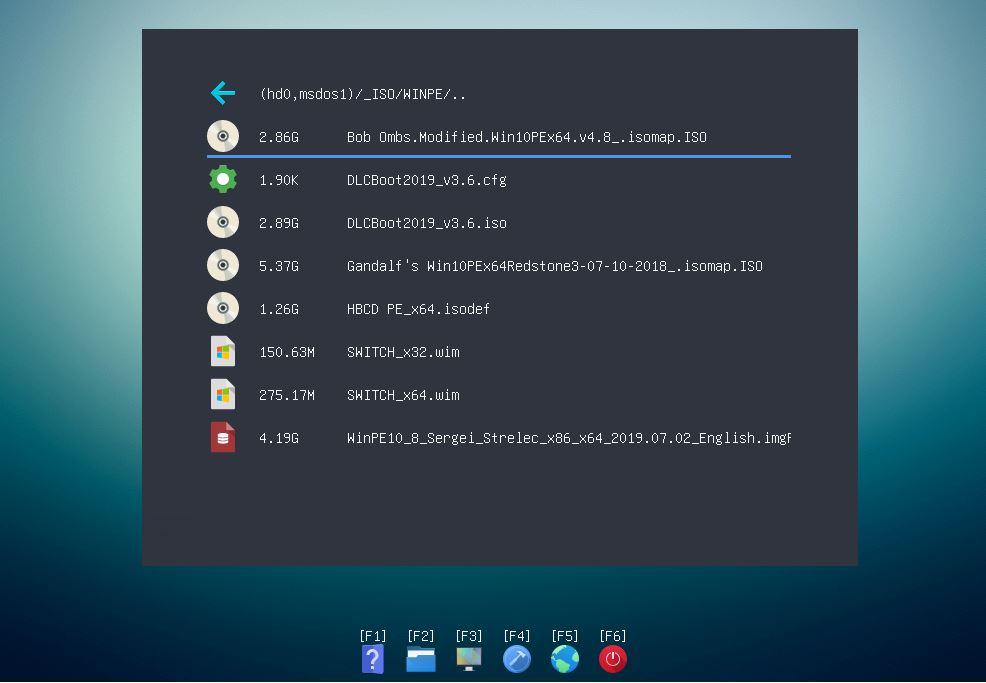
The WinPE payloads on my USB drive include:

  • Bob Omb's WinPE
  • Medicat
  • DLCBoot 2019 (must use .cfg or .grubfm file)
  • Gandalf'sWin10PE
  • Hirens Boot CD PE
  • Sergei Strelecs Win8\10 PE (.imgPTN23)
  • and a few others


E2B Menu

agFM (UEFI64) menu


However, now some of these old Win PEs have applications which are a bit outdated.
Also, I would like to add more shortcuts to the Desktop for apps which I use frequently.
I would like to add some portable apps too.
Having one or two apps auto-start would be nice as would changing the wallpaper.
But the ISO cannot easily be changed - right?

WRONG!

PEStartup

By using the 'PE Startup.exe' written by the author of AIOBoot, I can boot to any of these WinPEs and instantly change all these things and add Portable Apps too.

Here is a screenshot of my Gandalf Redstone3 desktop (looks a bit different, doesn't it!):

To do this, you need to add the PEStartup files from Tutorial 143 on my RMPrepUSB.com website.
Extract the files to the root of the agFM FAT32 partition (or the 3rd partition if you have one). It would be better to use the 2nd FAT32 partition because it should always be present even when using .imgPTN23 files.

Quick Instructions

agFM v1.44 released


  • Latest grub2\agFM version
  • Fixes bug when ISO files which don't have a .iso file extension won't UEFI-boot (e.g. xxx.iso would boot but some xxx.isodef would not).
  • Additional types recognised, e.g. .isodef64
To update, run \e2b\Update agFM\Download and update agFM.cmd.


E2B v2.03a Beta is available

E2B v2.03a (Beta) just has a small tweak to QRUN.cmd so that any file which has the three letters 'MBR' (not case-sensitive) anywhere in it's extension can be used.

For example: any file with the file extension .isodef32MBR will be booted as if it had an extension of .isodef but will only be listed on systems with 32-bit CPUs (i.e. exactly the same as if it had a .isodef32 file extension).

.isoPEMBR == .isoPE

Note however, that you can't add 'MBR' into the file extensions of files which are under \_ISO\WINDOWS\xxxxx folders as then they won't be seen by E2B. This trick only works in the standard E2B menu folders.

So what's the point of simply ignoring the three letters 'MBR' in a file extension?

Well, it means that the agFM file system will not list the file. So if you want to prevent any payload file from being listed in the agFM menu (e.g. when UEFI-booting to the agFM menu), then you simply add 'MBR' to the file extension.

This means that files which do not support UEFI-booting will not be listed in the agFM menu - e.g. DOS ISOs, DOS floppy images (.ima), old HBCD ISOs, etc.

'Great!' you may say, but how do I hide files from the E2B menu system? For instance, what if I have an ISO which does not support MBR booting at all and only UEFI-boots?

Well, you simply don't place it in an E2B menu folder. For instance, if you have a Linux ISO which does not MBR-boot, put it in a folder named \_ISO\LINUX\UEFI. If it only UEFI64-boots then use a .iso64 file extension or .isodef64 so that no secondary menu is shown.

Saturday, 18 April 2020

E2B v2.02 released

v2.02 is now live and is just a small update to E2B.

  • Latest WinContig.exe (small bugfixes wont affect 99.9% of users)
  • Add support for .isoagfm extension (same as .isodef)
  • Update new ChocBox.cmd and ChocolateStore.exe (now requires .Net 4.8)
  • Bugfix in Make USB cmd - if  user specifies 32GB FAT32 then it failed to format it.
If you want to install offline Chocolatey packages using the offline SDI_CHOCO install process, you will need to make the packages using ChocolateStore. However, it no longer worked because .Net 4.8 is now required to download the package files. The developer has just updated the executable, so now we are back in business.

In case you didn't know, once you have set up a Windows SDI_CHOCO configuration on your E2B drive, you can quickly install Windows with the correct locale/language/country options, Windows components, add extra missing drivers (auto-detected and installed), install applications (online or offline Chocolate) and your own app packages and tweak the final settings. During installation it actually speaks to you to let you know what's going on at each stage (if you have speakers connected).

Get the latest eBook revisions for free!

In case you didn't realise it, if you have purchased any eBooks, you can get the latest versions for free!

Just click on the download link sent to you by Payhip and you can download the latest version.

Up to 5 downloads per eBook are allowed, but if you need more, just let me know. The four E2B eBooks have all been updated just recently.
  • eBook #1: Getting started with Easy2Boot v2.17.pdf
  • eBook #2: How to install Microsoft Windows using Easy2Boot v1.6.pdf
  • eBook #3: How to make a UEFI multi-boot Easy2Boot USB drive v1.00.pdf
  • eBook #4: UEFI-multiboot using the a1ive grub2 File Manager v1.6.pdf
  • Getting started with grub4dos_v0.95.pdf